



Gift production workflow for UK print shops
Run every personalised gift job through this sequence: intake → prepress → print/transfer → cure/finish → QC → pack → dispatch. Three things you need in place before you start: a standard job ticket, a press-recipe log, and a single inspection gate before packing. Get those three right and most quality failures disappear before they reach the customer.
Before the stages: the industry term for what this article covers is production workflow or manufacturing SOP. “Workflow for gift production” is the search phrase, but in the shop it is your SOP, your recipe log, and your job-ticket system working together.
Must-haves for immediate implementation:
- A job ticket capturing SKU, substrate, quantity, technology, press recipe ID, and delivery date
- A press-recipe log with time, temperature, and pressure recorded per substrate
- A first-article inspection gate: one signed-off sample before the full run proceeds
Key takeaways
A documented production workflow, covering intake through dispatch, is the single most effective way to reduce rejects and increase throughput in a personalised gift print shop.
| Point | Details |
|---|---|
| Start with a job ticket | Capture SKU, recipe ID, quantity, and delivery date before any file moves to prepress. |
| Log every press recipe | Record time, temperature, and pressure per substrate; adjust and re-record whenever settings change. |
| Run a first-article gate | Sign off one sample before the full run proceeds to catch recipe drift and file errors early. |
| Pre-print DTF transfers | Produce transfers during off-peak hours and store at 20–25°C; they remain usable for up to six months. |
| Source from Subliblanks | Trade accounts with no minimum order quantities give you case pricing on blanks, inks, and consumables. |
Table of Contents
- What does an efficient gift-production workflow actually look like?
- How to capture orders, job tickets and approvals without rework
- What prepress checks prevent quality failures across all technologies?
- Printing and transfer: practical rules for each technology
- How do you cure, finish and assemble multi-component gifts?
- How to keep rejects under control with a QC gate
- How do you schedule runs to get the most from your presses?
- Inventory, consumables and maintenance: keeping the line running
- Costing, lead times and pricing for UK trade customers
- How to package personalised gifts so they arrive in perfect condition
- SOP checklist and copy-paste job-ticket template
- Waste management and sustainability in a gift print shop
- Handling customer communication and revisions during production
- What the recipe log actually changes in a print shop
- Stock tested blanks, consumables and equipment from a UK trade supplier
- Sources
What does an efficient gift-production workflow actually look like?
The production arc is consistent across technologies: design, print or engrave the transfer, prepare the blank, press or apply, inspect, pack. What changes is the decision logic at each gate.
| Stage | Key input | Common failure point |
|---|---|---|
| Order intake | Job ticket, approved artwork | Missing file, wrong substrate specified |
| Prepress | Print-ready file, ICC profile | Wrong DPI, unmirrored artwork, missing bleed |
| Print/transfer | Substrate-matched recipe | Recipe drift, wrong media loaded |
| Cure/finish | Time, temperature, pressure | Under-cure, ghosting, scorch |
| QC | Inspection checklist | No gate, defects reach packing |
| Pack | Protective insert, presentation box | Transit damage, wrong label |
| Dispatch | Carrier label, VAT paperwork | Delay from missing documentation |
Defects cluster at two points: prepress (file errors, wrong colour profile) and the press stage (recipe drift, substrate mismatch). A documented recipe log and a first-article check before each run address both.
How to capture orders, job tickets and approvals without rework
Getting intake right saves more time than any press upgrade. Every job that enters production without a complete ticket will stall somewhere downstream.
- Capture the blank SKU and substrate colour at intake. Sublimation on a cream-coated blank produces a different result than on white; record the exact product code.
- Record the technology and press recipe ID. Link the job to a named recipe in your log, not a verbal instruction.
- Confirm print dimensions, bleed, and placement before the file moves to prepress. A placement photo or mock-up image is the fastest way to avoid repositioning disputes.
- Get written approval on the proof. For repeat orders, a reference to the previous job number is sufficient. For new designs, a signed-off PDF or email confirmation is the minimum.
- Set the delivery date and flag the technology’s lead time. A one-off sublimation mug can leave same day; a run of 50 DTF-printed sports tops needs 2–3 days minimum.
- Assign a responsible operator so accountability is clear if a rework question arises later.
For turnaround: single-piece personalised items (sublimation, badge) can realistically turn the same day if the file arrives before 10 AM. Batch runs of 20+ pieces need at least one working day for print, cure, QC, and packing.
What prepress checks prevent quality failures across all technologies?
Prepress is where most downstream defects are born. A ten-minute file check before printing saves a full remake.
For sublimation, load the ICC profile that matches your specific printer, ink set, and blank combination. A mismatch between the profile and the actual substrate is the single most common cause of colour shift on sublimation blanks. Soft-proof in your RIP before committing to a full run.
Pro Tip: Keep a named ICC profile folder per printer, labelled by printer model and ink batch. When you change an ink set, create a new profile rather than reusing the old one.
Printing and transfer: practical rules for each technology
Choose your method by surface geometry, colour requirement, and durability expectation rather than defaulting to one process for everything. Each technology has a distinct strength: sublimation for full-wrap polymer-coated goods, laser for permanent monochrome marks on metal and wood, DTF for flexible full-colour on curved or irregular surfaces.
Sublimation
- Substrate must be polyester fabric or a polymer-coated hard good; no white ink is possible, so blanks must be white or very light
- Typical press parameters: elevated temperature for several tens of seconds under medium pressure (test and record per blank)
- Common defects: ghosting (transfer moved during press), scorch (too hot or too long), colour shift (wrong ICC or uncoated blank)
- Test every new blank batch with a first-article before committing the run
DTF (direct-to-film)
- The sequence is fixed: print on PET film → apply hot-melt powder → cure in oven → heat-press to substrate
- Oven setpoints typically run in a moderate temperature range; the film surface needs sufficient heat exposure for an extended period
- Cold peel produces a matte, soft finish; hot peel may risk loss of fine detail
- Use finer powder grades for garments (better hand feel), coarser grades for hard goods (stronger adhesion)
- Treat DTF as a connected production line: most failures trace to a gap between stages, not the printer itself
Laser engraving (xTool)
- Suitable for wood, MDF, leather, anodised aluminium, acrylic, and coated metals; always check material safety data before engraving unfamiliar stock
- Cutting vs engraving settings differ significantly: engraving uses lower power and higher speed; cutting reverses that
- Fix the workpiece with registration jigs for repeat jobs; a 1 mm shift ruins a personalised item
- Run fume extraction continuously; MDF and acrylic produce hazardous particulates
Badge and stamp workflows
- Artwork must be within the die boundary with no fine detail below 0.5 mm
- Prepare the plate, load the badge shell, and press at the manufacturer’s specified tonnage
- Typical throughput for 25 mm round badges: 200–300 per hour on a manual press
How do you cure, finish and assemble multi-component gifts?
The finishing sequence matters as much as the press settings. Rushing cool-down causes warping on rigid substrates; skipping a secondary press on a multi-layer DTF transfer causes edge lifting.
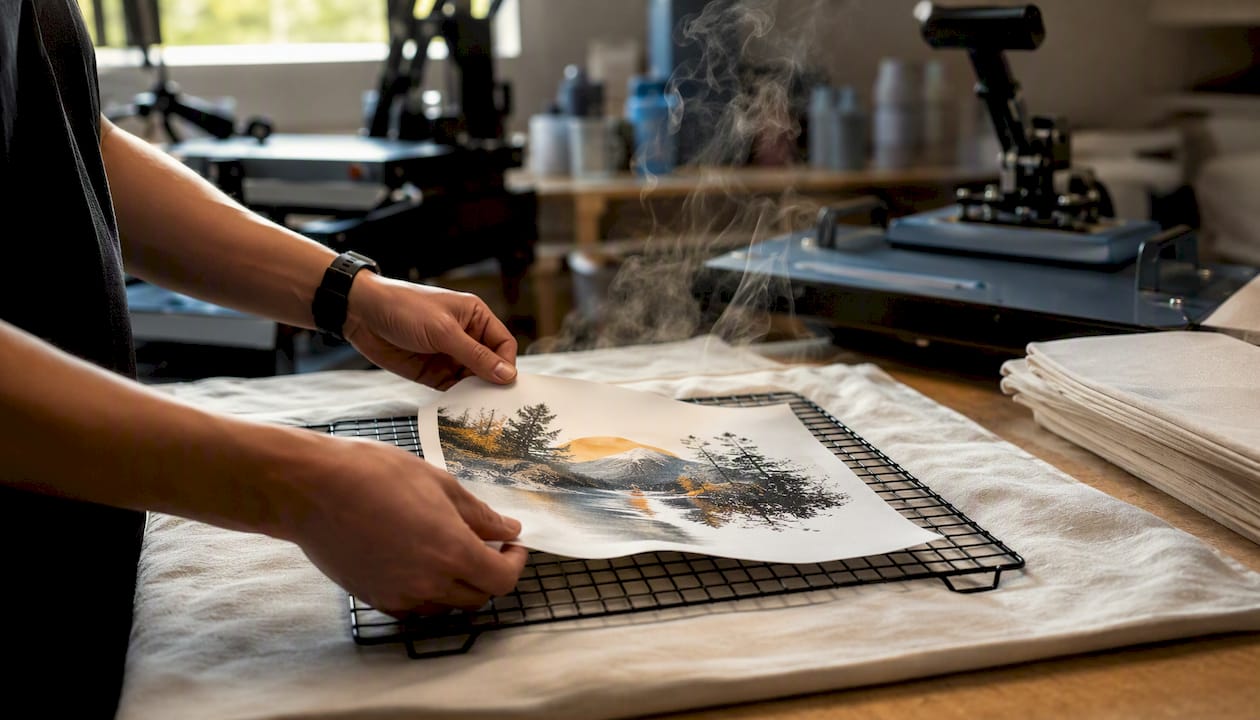
Order of operations: primary press → cool-down on a flat surface → secondary press if required → trim or cut → assembly → protective treatment (tissue, sleeve, or box).
These are starting points. Record your actual results per blank batch in your recipe log and adjust from there. For a multi-component gift (mug, presentation box, printed card), complete and QC each component separately before assembly. Assembling a defective mug into a gift box wastes the box.
How to keep rejects under control with a QC gate
A QC gate before packing is the single most effective margin protection in a personalised gift shop. Without it, defects reach customers.
- Registration: print is centred and within the specified placement zone
- Colour fidelity: compare against the approved proof or a reference print; flag any visible shift
- Adhesion check: on DTF and badge items, attempt a fingernail scratch at an edge; any lift is a fail
- Surface defects: check for ghosting, scorch, ink bleed, scratches, or press marks
- Packaging readiness: confirm the item is clean, dry, and free of fingerprints before it enters the box
Sampling plan: inspect every item on runs of 10 or fewer. For runs of 11–50, inspect a minimum of 20% plus the first and last piece. For runs above 50, inspect 10% with mandatory first-article and last-article checks. For premium or corporate orders, 100% inspection regardless of quantity.
Rework policy: if a defect is cosmetic and within the agreed tolerance, rework before packing. If the defect is structural (adhesion failure, wrong substrate pressed), remake at production cost. Set a time window: rework must complete within the same shift; remakes within 24 hours.
How do you schedule runs to get the most from your presses?
Batching by substrate, colour, and recipe is the fastest way to increase throughput without buying more equipment. Every recipe changeover costs time; minimise them.
A simple daily capacity estimate: available press minutes ÷ (cycle time per piece + changeover per batch) = pieces per day. For a single heat press running 8 hours with a 45-second cycle and 5-minute changeover between batches of 10, you get roughly 480 pieces on a single substrate day, dropping to around 350 when you factor in three recipe changes.
| Cell type | Job type | Scheduling rule |
|---|---|---|
| Rapid-turn cell | Single-piece personalised items | First in, first out; target same-day dispatch |
| Batch cell | Runs of 10+ same substrate | Group by recipe; run largest batches first |
| Pre-print buffer | DTF transfers | Print ahead during off-peak hours; store for press-on-demand |
DTF transfers stored correctly in opaque polyethylene at typical room temperature remain usable for several months. Pre-printing transfers during quiet periods converts idle printer time into inventory and reduces pressure at the press station during Q4 peaks.
Inventory, consumables and maintenance: keeping the line running
Par levels prevent the stockout that stops a run mid-batch. Set them per consumable based on your weekly usage, not on gut feel.
- Inks: minimum two weeks’ supply at current usage; order at one week remaining
- Transfer paper/film: one box per active technology in reserve
- DTF powder: one kilogram per powder grade in reserve
- Heat-resistant tape and protective sheets: replenish monthly
- Packaging: maintain a two-week buffer of your top three box sizes
Daily maintenance: wipe platens, check pressure calibration, inspect printhead nozzles (run a nozzle check print). Weekly: clean encoder strips, lubricate press pivot points, check ink lines for air. Monthly: deep-clean printheads on Epson and Ricoh sublimation printers per the manufacturer’s maintenance schedule, and calibrate press temperature with a contact thermometer.
Trade accounts with a wholesale supplier like Subliblanks let you buy inks, blanks, and consumables by the case, which smooths costs and reduces the per-unit price on high-turnover lines.
Costing, lead times and pricing for UK trade customers
Every job needs a loaded cost before you price it. The formula: materials + consumables + labour (£/minute × minutes) + overheads + packing + margin.
Example: a personalised sublimation mug. Blank: £2.50. Ink and paper: £0.40. Labour at £0.25/minute × 8 minutes: £2.00. Overheads (press depreciation, electricity): £0.30. Packing (box, tissue, label): £0.80. Total cost: £6.00. At a 50% margin, the trade price is £9.00.
For a run of 50 DTF-printed polyester sports tops: blank cost per unit £4.00, film and powder £0.60, labour 4 minutes per unit at £0.25 = £1.00, overheads £0.20, packing £0.30. Unit cost: £6.10. At 40% margin: £8.55 per unit trade price.
| Technology | Order size | Typical turnaround | Q4 note |
|---|---|---|---|
| Sublimation | 1–5 pieces | Same day | Add 1 day from mid-November |
| Sublimation | 6–50 pieces | 1–2 days | Add 2 days |
| DTF | 1–10 pieces | 1–2 days | Add 1 day |
| DTF | 11–100 pieces | 2–4 days | Add 2–3 days |
| Laser engraving | 1–20 pieces | 1–2 days | Add 1 day |
| Badge/stamp | 1–100 pieces | Same to 1 day | Minimal impact |
Build Q4 buffers into your customer-facing lead times from the first week of November. Shops that do not communicate this lose repeat customers to missed Christmas deadlines.
How to package personalised gifts so they arrive in perfect condition
Packaging is the last quality gate. A perfectly printed mug that arrives cracked is a refund and a lost customer.
- Mugs and tumblers: individual mug box with foam or pulp insert; never stack without dividers
- Coasters and plaques: wrap in tissue, place in a rigid box or padded envelope with kraft filler
- Textiles: fold flat, wrap in tissue, seal in a polybag before boxing
- Badges: individual cello bags, then a rigid outer box for quantities above 20
- Multi-component gift sets: assemble in a presentation box with a printed card; use a tamper-evident seal for corporate orders
Label every outer box with the SKU, order reference, and recipient name for personalised orders. For trade shipments within the UK, VAT is charged at the standard rate (20%) on most printed goods; zero-rating applies only to specific printed matter such as books and leaflets, not personalised gifts. For shipments to Ireland (Republic), goods are zero-rated for VAT at the UK point of sale if the customer is VAT-registered and you hold their VAT number; check HMRC guidance for current rules on cross-border B2B supply.
For sublimation promotional items destined for corporate clients, a presentation box with a branded insert card adds perceived value without significant cost.
SOP checklist and copy-paste job-ticket template
A shop SOP does not need to be long. It needs to be followed.
Production SOP checklist (copy into your system):
- Intake: complete job ticket; confirm file received and approved; assign recipe ID and delivery date
- Prepress: run file checks (DPI, mirror, bleed, white layer); apply ICC profile; soft-proof; save print-ready file to job folder
- Print/transfer: load correct media; confirm recipe settings match log; print first article; sign off before full run
- Cure/finish: press per recipe; cool on flat surface; secondary press if required; trim and assemble
- QC: inspect per sampling plan; record pass/fail; rework or remake within policy window
- Pack: wrap, box, label with SKU and order reference; tamper-seal corporate orders
- Dispatch: confirm carrier label matches delivery address; file despatch note
Job-ticket template (copy-paste):
Order ref:          | Date received:
Customer name:      | Delivery date:
Blank SKU:          | Substrate colour:
Technology:         | Press recipe ID:
Print size (W×H):   | Quantity:
Artwork file:       | Proof approved (Y/N):
Operator:           | First-article signed off (Y/N):
Notes:
Pro Tip: Add a “recipe change” field to your press log. Any time you adjust time, temperature, or pressure from the standard recipe, record the reason. After three months, you will have a calibration history that tells you exactly when a press is drifting.
For a detailed walk-through of the sublimation transfer process and how to structure your first-article checks, the SubliBlanks blog has step-by-step guides written for trade shops. The 2026 DTF workflow guide covers RIP settings, powder grades, and press parameters in detail.
Waste management and sustainability in a gift print shop
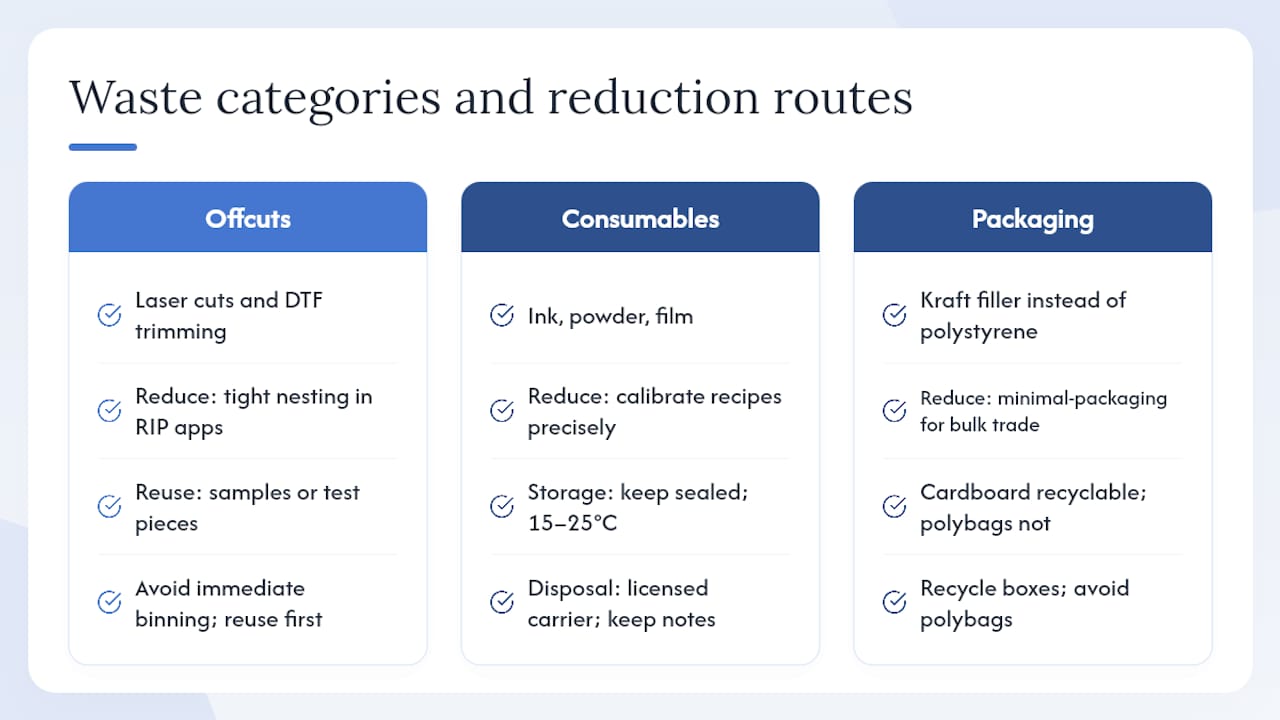
Waste in a print shop falls into three categories: substrate offcuts, consumable waste (ink, powder, film), and packaging waste. Each has a practical reduction route.
Substrate offcuts from laser cutting and DTF film trimming accumulate fast. Nesting artwork tightly on the film or sheet before printing reduces offcut volume; many RIP applications include a nesting function for this purpose. Offcuts of MDF and acrylic can often be used for sample prints or test pieces rather than binned immediately.
Ink and powder waste drops sharply when you calibrate recipes accurately. An over-powered laser pass or an over-cured DTF transfer wastes energy and degrades the substrate. Keeping inks sealed and at the correct storage temperature (typically 15–25°C for most sublimation and DTF inks) extends shelf life and reduces disposal from expired stock.
For packaging, switch to recycled kraft filler over polystyrene chips where transit protection allows. Cardboard presentation boxes are widely recyclable; polybags are not. Offering customers a minimal-packaging option for trade bulk orders reduces both cost and waste.
Dispose of spent inks, cleaning fluids, and chemical waste through a licensed waste carrier. The Environment Agency’s waste duty of care applies to all UK businesses; keep transfer notes for any hazardous waste removed from your premises.
Handling customer communication and revisions during production
Most revision requests arrive because the customer did not fully visualise the final product from a flat proof. A placement mock-up (a photo of the blank with the artwork overlaid to scale) reduces revision requests more than any other single step.
Set a clear revision policy at intake: one free revision before production starts; revisions after production approval are charged at the reprint rate. State this in writing on the job ticket or order confirmation. Customers who understand the policy upfront rarely dispute it.
During production, communicate proactively. If a file issue or substrate problem will delay the job, notify the customer before the original delivery date, not after it passes. A short message with a revised date and a reason retains far more goodwill than silence followed by a late delivery.
For repeat customers, keep a reference file of their approved designs and press recipes. When they reorder, confirm the reference rather than starting the approval process from scratch. This alone cuts intake time on repeat jobs by more than half.
What the recipe log actually changes in a print shop
Most shops that struggle with consistency are not using bad equipment. They are running the same substrate on different days with slightly different settings and wondering why the colour shifts. The recipe log is the fix, and it costs nothing to implement.
The shops that scale without chaos are the ones that treat production as a documented system from the start. Batching by recipe, running a first-article gate, and pre-printing DTF transfers during quiet periods are not complicated ideas. They are just disciplines that most small shops defer until the Q4 rush makes the cost of not having them obvious.
One practical observation: the QC gate is the section most shops skip when they are busy. That is precisely when it matters most. A single defective item in a corporate gift order does more damage than the cost of the remake. Build the gate into the SOP so it is not optional.
Stock tested blanks, consumables and equipment from a UK trade supplier
Subliblanks supplies sublimation blanks, DTF film and powder, xTool laser machines, badge-making supplies, and packaging to UK and Ireland trade customers, with no minimum order quantities. Whether you are setting up a new press line or replenishing consumables mid-run, you can order exactly what you need without committing to a pallet.
Trade account holders get case pricing on high-turnover lines, which makes a material difference to unit costs on inks, transfer paper, and packaging. Browse the full range of sublimation printers and equipment including Epson and Ricoh models, or visit the Subliblanks trade store to source blanks, consumables, and packaging in one order.
Sources
- How do you start a sublimation printing business in 2027?
- DTF Printing Workflow for Print-on-Demand Apparel Orders - Po-try
- UV Printing vs Laser Engraving vs Sublimation vs UV DTF – LIMTEH PROJECT


