



What is a badge cutter? Your complete 2026 guide
TL;DR:
- A badge cutter is a die cutting machine that trims printed badge artwork into specific shapes and sizes. It is essential for producing neat, professional badges efficiently, especially in high-volume or repeated production.
A badge cutter is a specialised tool designed to trim printed badge artwork into exact shapes and sizes, making it a core part of any badge making workflow. The industry term for the device is a die cutter or badge die cutting machine, though “badge cutter” is the phrase most crafters and small businesses use day to day. These tools handle materials including 110–160 gsm papers and thin films up to 0.076mm thickness, cutting them cleanly and repeatably. Desktop models typically weigh between 3 and 5 kg, giving them the stability needed for consistent cuts. Without a badge cutter, producing neat, professional badges at any volume is genuinely difficult.
What is a badge cutter and how does it work?
A badge cutter is a die cutting machine that uses a shaped steel blade to punch or slice badge artwork into a fixed outline, most commonly a circle. The blade sits inside a cutting die, and when you press the lever or handle, the die forces the blade through the paper in one clean motion. The result is a perfectly shaped piece of artwork ready to be loaded into a badge press.
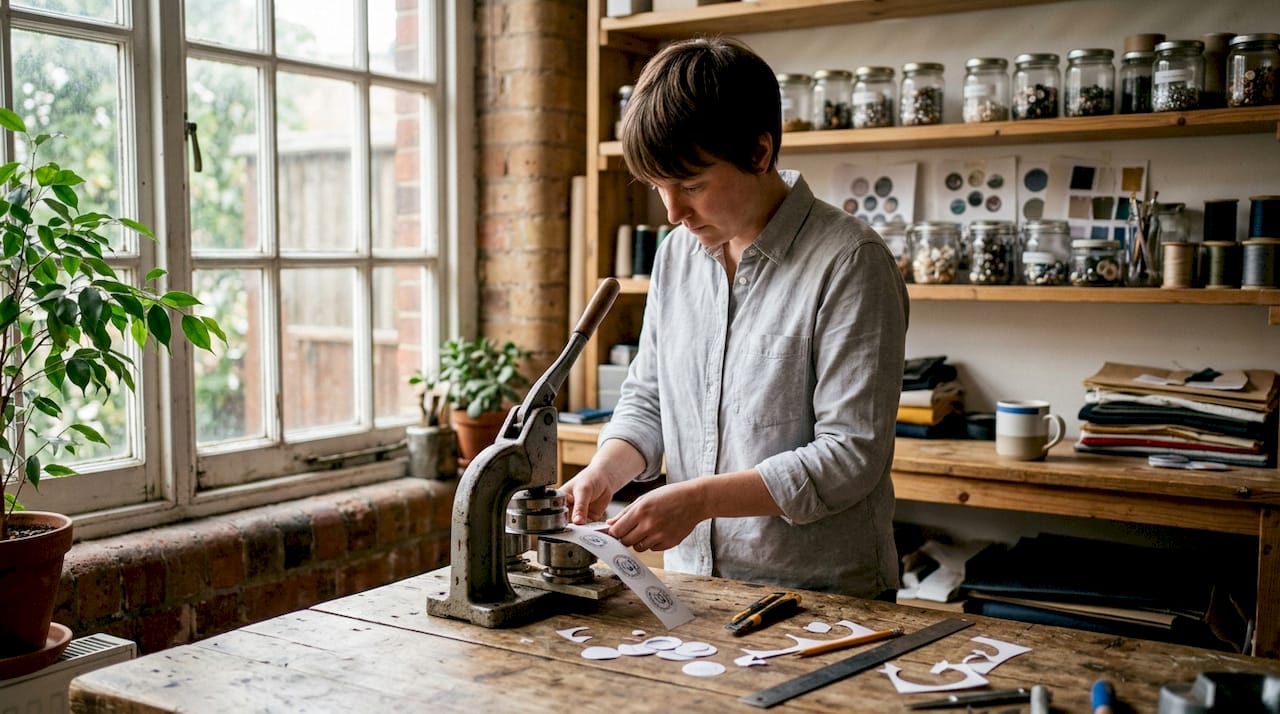
The manual lever-operated process follows four steps. First, you place the printed paper strip onto the cutting platform. Second, you align the artwork with the cutting die so the design sits centred within the blade outline. Third, you press the handle firmly and evenly. Fourth, you lift the handle and remove the trimmed badge shape. This process produces accurate, consistent circular cuts quickly and suits small batch production well.
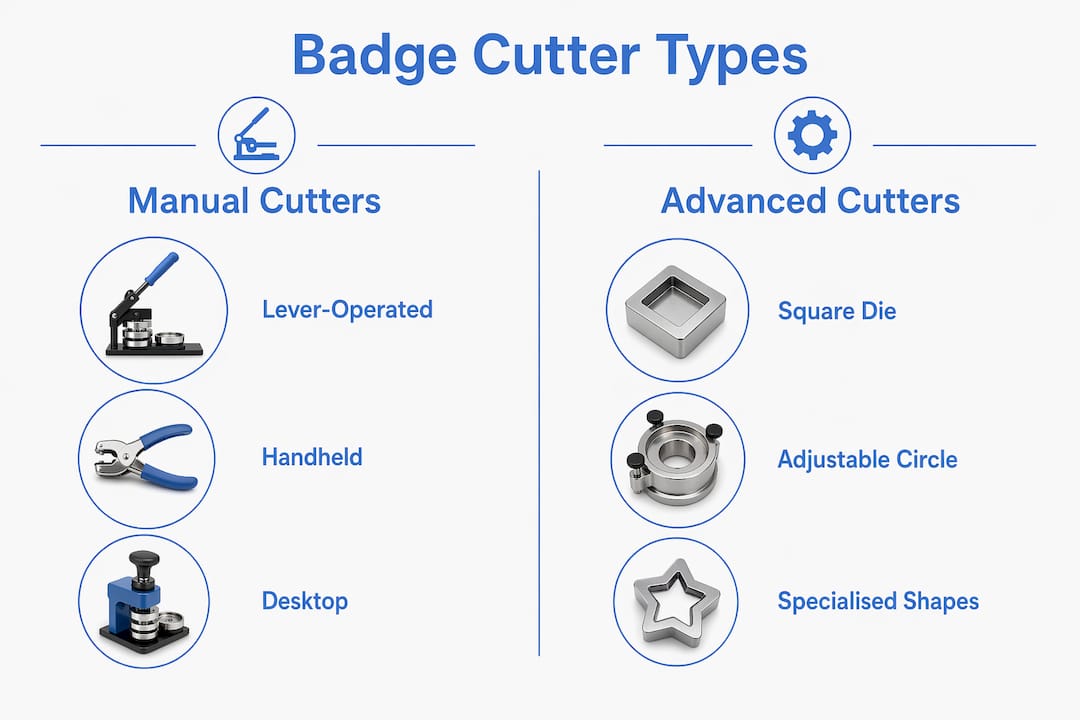
Manual lever-operated cutters
Manual lever-operated cutters are the most common type found in schools, craft studios, and small businesses. They use a spring-action lever to drive the cutting die downward with controlled force. Long spring-action lever handles and anti-slip rubber bases reduce operator fatigue and keep the machine stable on a desk. Heavy-duty metal bodies with powder coatings extend the working life of these machines considerably.
Handheld cutters
Handheld badge cutters are compact devices suited to quick, occasional jobs. They are portable and easy to store, but they sacrifice the stability and repeatability that a desktop unit provides. Handheld cutters are best for portability and occasional use, while desktop models are the standard choice for commercial or high-volume badge making. If you are producing more than a handful of badges at a time, a desktop unit is the better investment.
Pro Tip: Always check that the cutting die shape matches your badge press mould before buying. A 58mm cutter paired with a 50mm press will produce oversized artwork that jams the machine.
How to choose the right badge cutter for your needs
Choosing the right badge cutting machine starts with matching the cutter size to your badge diameter. Badge cutters come in fixed sizes including 25mm, 37mm, 44mm, 50mm, and 58mm to align with standard badge press moulds. Mismatching cutter size to badge size causes uneven edges and wastes materials. That single mistake accounts for most of the frustration beginners experience.
Key factors to weigh when selecting a badge maker tool:
- Material compatibility. Confirm the cutter handles your paper weight. Most desktop cutters manage 110–160 gsm coated paper and thin PVC films without difficulty.
- Blade quality. Steel blades hold their edge longer than cheaper alloys. A dull blade produces ragged edges that ruin the finished badge.
- Base stability. A heavy-duty metal base with anti-slip rubber feet prevents the machine from shifting mid-cut. Businesses producing badges regularly benefit from stable, clampable desktop units that reduce fatigue and maintain accuracy.
- Blade tensioning. Some machines allow you to adjust blade tension as the blade wears. This extends the useful life of the cutting die significantly.
- Safety features. A finger guard or recessed cutting platform keeps fingers clear of the blade path. This matters especially in school or community workshop settings.
Pro Tip: Run five test cuts on scrap paper every time you move or reassemble the machine. Testing on scrap paper after adjusting the machine confirms the blade is seated correctly and prevents wasted artwork on your first real batch.
How to use a badge cutter effectively in craft and business settings
Preparing your artwork correctly before cutting saves time and reduces waste. Print your badge designs onto the correct paper weight and allow the ink to dry fully before feeding sheets through the cutter. Wet or damp paper compresses under the blade and produces fuzzy edges. Lay out your designs with a small margin between each one so the cutting die does not clip an adjacent image.
Integrating your badge cutter with your badge press is where the full badge making process comes together. Cut the artwork first, then cut the clear film overlay to the same size. Load both into the badge press shell in the correct order: shell, artwork face down, film overlay, then the pin back. A cutter that matches the press diameter makes this assembly fast and error-free.
For high-volume badge production, these practices make a measurable difference:
- Batch your cutting. Cut all artwork for a run before pressing any badges. Switching between cutting and pressing repeatedly slows you down and increases misalignment errors.
- Use printed cutting guides. Print a faint circle guide on your artwork sheet so you can position each design under the die by eye quickly.
- Rotate your paper strips. If one edge of the cutting die produces slightly rougher cuts than the other, rotate the paper 180 degrees on the next cut. Uneven blade wear is common and easy to compensate for.
- Store cut artwork flat. Stacking cut circles in a small tray keeps them from curling before pressing, which matters particularly in warm workrooms.
For occasional badge production, such as a one-off school event or a craft fair, a handheld cutter or a basic desktop unit with a single fixed die is sufficient. For schools, event merchandise suppliers, and small businesses producing badges regularly, a desktop badge machine paired with a matching fixed-size cutter is the most reliable combination.
Advanced and specialised badge cutter types
Not every badge is round. Square badge cutters address a genuine gap in the standard range and are worth understanding if you work with corporate or school ID badges.
Square die cutters
Square badge cutters with heavy-duty manual presses trim artwork to 50x50mm for distinctive square badges commonly used in school and corporate ID contexts. These machines use aluminium precision moulds and cast iron frames to produce clean, wrinkle-free cuts. The cast iron frame absorbs the pressing force evenly, which prevents the slight rocking motion that causes misaligned cuts on lighter machines.
Adjustable circle cutters
Adjustable circle cutters allow you to set different badge diameters using an Allen key and a movable cutting wheel. This makes them attractive if you work with multiple badge sizes on a single machine. The trade-off is that they require careful calibration each time you change the diameter setting, and an incorrectly set wheel can damage the blade. Fixed-size cutters are faster and more reliable for single-size production runs.
| Cutter type | Best for | Key advantage | Main limitation |
|---|---|---|---|
| Fixed-size desktop | Single-size, high-volume runs | Speed and repeatability | One size only per die |
| Adjustable circle | Multi-size, low-to-medium volume | Flexibility across diameters | Requires recalibration between sizes |
| Square die cutter | Corporate and school ID badges | Distinctive shape, clean edges | Not compatible with round badge presses |
| Handheld cutter | Occasional, portable use | Compact and lightweight | Lower precision, higher fatigue |
Powder-coated metal bodies and anti-slip bases are now standard on quality desktop cutters across all types. These features are not cosmetic. Powder coating resists chipping and corrosion in workshop environments, and a stable base is the single biggest factor in cut consistency over a long production run.
Key takeaways
A badge cutter is a die cutting machine that must match your badge press diameter to produce clean, professional results at any production volume.
| Point | Details |
|---|---|
| Match size to press | Always buy a cutter sized to your badge press diameter to avoid uneven edges. |
| Test before full runs | Cut five scrap pieces after any adjustment to confirm blade seating and edge quality. |
| Desktop beats handheld for volume | Fixed-size desktop cutters deliver better precision and less fatigue for regular production. |
| Material limits matter | Most desktop cutters handle 110–160 gsm paper and thin films up to 0.076mm thickness. |
| Advanced types serve niche needs | Square and adjustable circle cutters suit specific badge shapes and multi-size workflows. |
Why I always tell beginners to buy the right size first
The most common mistake I see from people starting out with badge making is buying a cutter that does not match their badge press. It sounds obvious, but the range of sizes available, 25mm, 37mm, 44mm, 50mm, 58mm, catches people out regularly. They buy a cutter based on price or availability, then find the artwork sits too loose or too tight in the press shell. The result is a batch of badges with off-centre designs and visible white edges. That is not a blade problem or a technique problem. It is a sizing problem, and it is entirely avoidable.
My second strong recommendation is to invest in a desktop model with a metal base from the start, even if you only plan to make badges occasionally. The stability difference between a lightweight plastic-based cutter and a 3 to 5 kg metal desktop unit is dramatic. You will feel it in your wrists after twenty cuts, and you will see it in the consistency of your edges. Handheld cutters have their place for travel or one-off jobs, but they are not the tool to build a badge making practice around.
Testing on scrap before every new run is a habit that separates people who get consistent results from those who waste materials. Five test cuts takes less than two minutes. It tells you whether the blade is seated, whether your paper weight is compatible, and whether your alignment guide is accurate. Skipping that step to save time almost always costs more time in the end.
— chris
Subliblanks has the badge making supplies you need
Subliblanks supplies a full range of badge making equipment including badge cutters, badge presses, and compatible materials, with no minimum order quantities. Whether you are setting up a badge making station for a school, a craft business, or a one-off event, Subliblanks stocks the tools to match your badge press size and production volume.
Subliblanks also carries pre-cut sublimation paper designed to work directly with badge cutters, saving preparation time on high-volume runs. Every product comes with UK availability and the quality assurance that trade buyers expect. Visit the Subliblanks website to browse the full badge making range and find the right cutter for your setup.
FAQ
What does a badge cutter do?
A badge cutter trims printed artwork into a precise shape, typically circular or square, so it fits correctly into a badge press. It produces clean, repeatable cuts that align with standard badge press mould sizes.
What sizes do badge cutters come in?
Badge cutters are available in fixed sizes including 25mm, 37mm, 44mm, 50mm, and 58mm to match standard badge press diameters. Adjustable circle cutters also exist for makers working across multiple badge sizes.
How do I use a badge cutter correctly?
Place your printed paper on the cutting platform, align the design under the die, press the lever firmly, and remove the trimmed shape. Always test on scrap paper first to confirm the blade is seated and producing clean edges.
What materials can a badge cutter handle?
Most desktop badge cutters handle coated paper in the 110–160 gsm range and thin films up to 0.076mm thickness. Heavier card stock or thicker plastics typically exceed the capacity of standard badge cutting machines.
When should I use a desktop cutter instead of a handheld one?
Use a desktop cutter for any regular or high-volume badge production. Desktop models provide the stability and repeatability that handheld cutters cannot match, and they reduce operator fatigue significantly over longer runs.


