



Why 95A Prints First: TPU Filament Hardness for 3D Printers
The Shore hardness number on a TPU spool tells you how firm the cured material feels, and it dictates how your printer will handle it. Start with a firm TPU grade typical of most “TPU” filaments unless your part needs to stretch, seal, or compress like rubber. Anything softer than 85A demands a direct-drive extruder and a much slower, more patient print profile.
TL;DR:
- TPU filaments with Shore A ratings below 85A are difficult to extrude and typically require a direct-drive extruder for successful printing.
- Most TPU filaments cluster between 85A and 98A, with 95A being the recommended starting point for ease of printing and flexibility.
- Softer grades like 85A need slower speeds, minimal retraction, and a direct-drive setup, whereas firmer grades up to 95A can often be printed with Bowden setups.
- Moisture absorption causes TPU to pop, hiss, and form voids during printing, so proper storage and drying at 50-60°C are essential for optimal results.
- Selecting ductile TPU depends more on printer hardware and print settings than on material hardness alone, with softer grades demanding more tuning and hardware adjustments.
Table of Contents
- What Shore hardness actually measures on a TPU spool
- Common TPU grades: feel, uses, and how hard they are to print
- Direct drive versus Bowden: what your hardware can actually handle
- Tuning your slicer to make a firmer TPU feel softer
- Keeping TPU dry: storage and the failures moisture causes
- Choosing the right hardness for your application
- Where this guidance comes from
- Why the printability question matters more than the spec sheet
- Ready to buy TPU filament and the accessories that keep it printable
- Sources
- FAQ
What Shore hardness actually measures on a TPU spool
Shore hardness comes from a durometer test defined by ASTM D2240, the industry standard for measuring how much a material resists indentation from a spring-loaded pin. A technician presses a needle into the material and reads how far it penetrates in a set time; softer materials let the needle sink further, giving a lower number.
TPU is measured almost exclusively on the Shore A scale, which covers everything from soft gel to firm rubber. Shore D exists for harder plastics and rigid rubbers, and you’ll occasionally see it on TPU that shades into semi-rigid territory, but most spools you’ll buy sit comfortably within Shore A. The two scales use different indenter shapes and springs, so a Shore A rating and a Shore D rating are not directly comparable; you can’t just subtract one from the other to convert.
Numbers alone don’t mean much until you attach a feel to them. Fabbaloo’s breakdown of the scale offers analogues that stick in your head: a soft pencil eraser sits around 40A, a shoe sole lands somewhere in the 80A to 90A range, and a hard skateboard wheel pushes up towards 98A. Desktop TPU filaments cluster in the firmer half of that range, mostly between 85A and 98A. Anything much softer becomes genuinely difficult to extrude through standard FDM hardware.
A few reference points worth keeping in mind:
- Shore A covers soft to medium rubber, roughly the range of pencil erasers, gaskets, and shoe soles.
- Shore D covers hard plastics and rigid rubbers, closer to a hard hat or a bowling ball.
- Filament labelled “TPU” without a number is commonly 95A or similarly firm, but always check the technical data sheet before assuming.
Common TPU grades: feel, uses, and how hard they are to print
Every jump of five points on the Shore A scale changes both what the part feels like in your hand and how much your printer will fight you during the print.
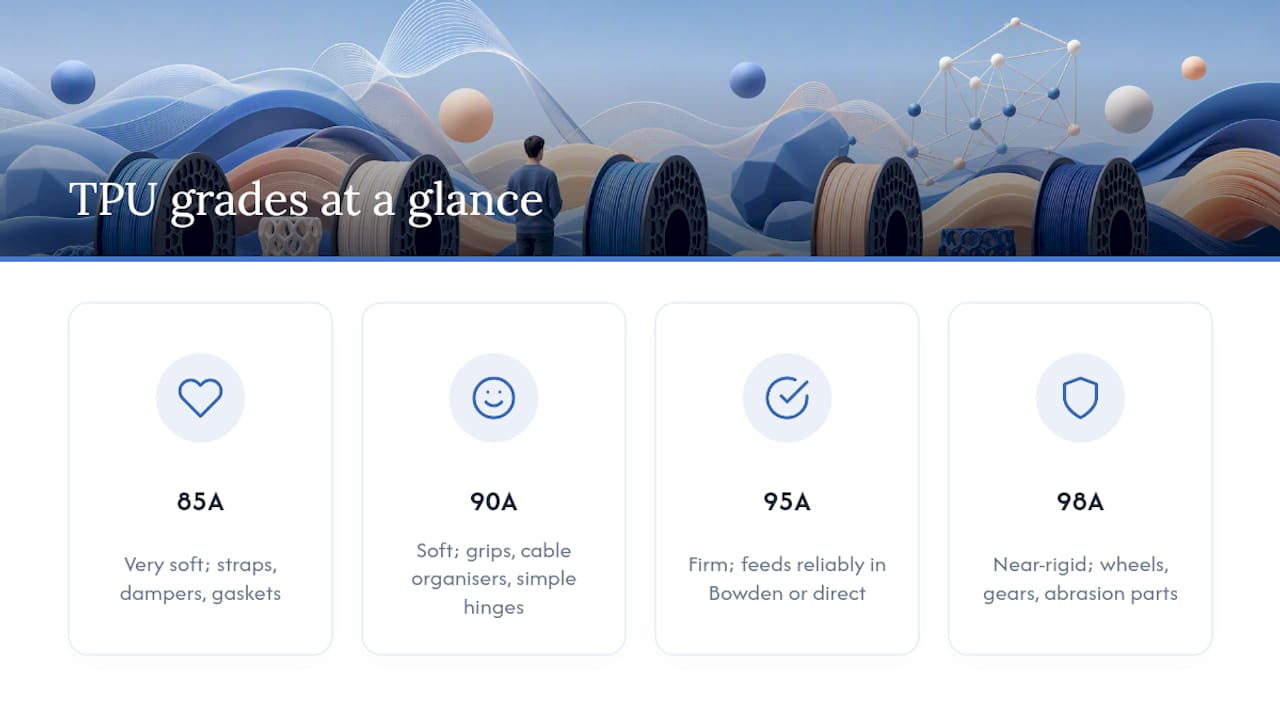
85A is genuinely soft, closer to a rubber band than a phone case. It suits wearable straps, vibration dampers, and gaskets that need real compression. Printing it well requires a direct-drive extruder, retraction dialled down close to zero, and speeds well under what you’d run for PLA. Siraya Tech’s comparison of 85A against 95A makes the difficulty gap plain: 85A buckles and jams far more readily on setups that aren’t built for it.
90A softens the compromise. It still flexes noticeably but tolerates a wider range of printers, provided you’ve tuned retraction and slowed things down in the areas that matter, such as sharp corners and bridges. It works well for phone grips, cable organisers, and simple living hinges.
95A is the grade most people should reach for first. It prints almost like a firm rubber, feeds reliably through Bowden systems as well as direct drive, and still flexes enough to be useful in thin-walled parts like phone cases or seals. Both Siraya Tech and Prusa’s own knowledge base point to this durometer as the sensible starting point for anyone new to flexible filament.
98A barely flexes at all in thick sections. Treat it as a near-rigid rubber rather than a stretchy material. It shows up in printed wheels, gears with a bit of shock absorption, and protective housings where abrasion resistance matters more than give.
Direct drive versus Bowden: what your hardware can actually handle
The reason soft TPU jams isn’t magic, it’s mechanics. Filament needs enough columnar strength to push itself through the hot end without buckling in the gap between the drive gear and the nozzle. Softer TPU has less of that strength, so a long, unsupported filament path turns into a coil of spaghetti the moment the drive gear tries to push.
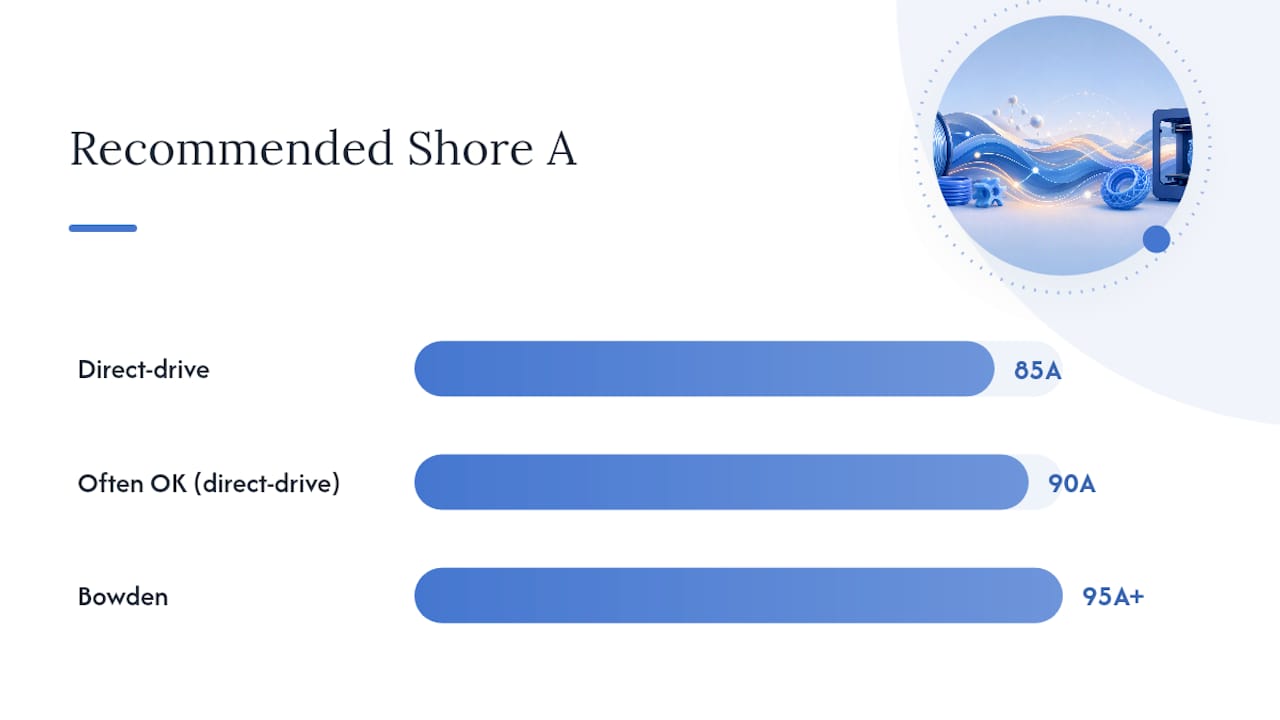
That’s why direct-drive extruders, where the drive gear sits right on top of the hot end, are recommended for 85A and often for 90A too. A shorter path means less room for the filament to buckle before it reaches the melt zone. Bowden setups, with their metre-long PTFE tube between extruder and nozzle, can still handle 95A and up, since firmer material resists collapsing under the push force.
If you’re not sure which camp your printer falls into, run through this checklist:
- Measure your PTFE tube length. Anything over 30cm between drive gear and hot end puts you firmly in Bowden territory, and you should stick to 95A or firmer.
- Check drive-gear tension. Too much pressure flattens soft filament instead of gripping it; too little lets it slip and grind.
- Look at your filament path for sharp bends. A tight bend near the extruder is often the exact spot where soft TPU buckles.
- Consider a filament guide tube from the spool to the extruder inlet if your setup has any exposed run where the filament can flex sideways.
- If you’re set on printing 85A on a Bowden machine, expect to fight it, or budget for a direct-drive conversion instead.
Pro Tip: Drop retraction distance to 0.5–1mm and retraction speed by roughly a third of your usual PLA settings before you touch anything else. Most TPU jams trace back to over-aggressive retraction pulling soft filament back into a buckle rather than a clean straight line.
Tuning your slicer to make a firmer TPU feel softer
Material hardness sets the ceiling, but your slicer settings and part geometry decide how soft the finished piece actually feels in someone’s hand. 3DBite’s grade guide makes the case well: a 95A print with two perimeters and 15% gyroid infill can flex noticeably more than the same file printed with four walls and 40% infill, even though the filament itself hasn’t changed.
Print speed and retraction still need to match the grade you’re using, roughly as follows:
- 85A: 15–25mm/s, retraction under 1mm, direct drive only.
- 90A: 20–35mm/s, retraction 1–2mm.
- 95A: 25–45mm/s, retraction 2–4mm, works on Bowden.
- 98A: near-standard PLA speeds are often fine, with retraction similar to a semi-flexible PETG profile.
Dropping perimeter count and infill density on a 95A part is a genuinely useful trick when you don’t have 85A on hand, but it has limits. It changes how a part deforms under gentle pressure; it does nothing for how the raw material behaves under sustained compression or repeated flexing, where the base durometer still governs fatigue life. Coasting, linear advance, and a slightly larger nozzle (0.6mm or above) also help by reducing pressure spikes that cause blobbing on soft materials, and cooling fans set too aggressively can make thin TPU walls brittle rather than pliable.
Keeping TPU dry: storage and the failures moisture causes
TPU absorbs atmospheric moisture more readily than PLA or PETG, and it shows up fast once you start printing. Wet TPU tends to pop and hiss at the nozzle, leave visible bubbles or voids inside the extrusion, and produce weak layer bonding that lets parts delaminate under flex.
Prusa’s knowledge base notes that this hygroscopic behaviour affects every hardness grade, not just the softer ones, so drying isn’t a step you can skip because you’re using a firmer 98A spool. Dry TPU in a filament dryer at 50 to 60°C for four to six hours; pushing much past 60°C risks softening the spool itself or warping the material before it even reaches the printer.
Store opened spools in an airtight container with fresh desiccant, and check the desiccant’s colour indicator regularly rather than assuming it’s still active. A quick troubleshooting checklist when something goes wrong:
- Popping or crackling sounds at the nozzle: dry the filament before doing anything else.
- Stringing between features: usually retraction, but can also be excess moisture, so rule both out.
- Poor layer adhesion on flex: check bed temperature and drying before blaming the slicer profile.
- Inconsistent extrusion width: often a symptom of a partially clogged nozzle from degraded, wet filament.
Choosing the right hardness for your application
Work backwards from what the part actually needs to do, not from whichever spool happens to be cheapest that week.
- Default to 95A unless you have a specific reason not to. It covers phone cases, protective bumpers, and most gaskets that don’t need extreme compression.
- Drop to 85A or 90A only when the part must compress significantly or stretch repeatedly, such as wearable straps, seals under load, or vibration dampers.
- Move up to 98A when the part needs to resist abrasion or hold its shape under load while still absorbing some shock, such as wheels or lightly flexible gears.
- Change your design before you change your filament if a 95A part feels too stiff. Fewer perimeters and a lower infill percentage often solve the problem without a new spool.
- Factor in cost and durability together. Softer grades wear faster under repeated flex, so a 98A part built for abrasion resistance often outlasts a softer equivalent doing the same job.
For functional, load-bearing prints where the choice of durometer genuinely changes whether the part survives its job, it’s worth reading through dedicated guidance on selecting filament for functional parts before committing to a spool.
Where this guidance comes from
This guide draws on printing guidance from manufacturers and material suppliers who publish real specification sheets and hardware compatibility notes, rather than marketing copy. Author chris has covered filament selection and printer setup across several posts, including practical breakdowns of how filament properties shape manufacturing outcomes and a broader guide to setting up and printing with different filament types.
Subliblanks supplies TPU filament alongside the drying and storage accessories that keep it printable, which matters more with flexible materials than with almost anything else in a typical filament cabinet.
[Author credentials, testing history, and any relevant case studies to be added here.]
Why the printability question matters more than the spec sheet
Most articles on TPU hardness stop at definitions: here’s Shore A, here’s Shore D, here’s a chart. That’s not particularly useful to someone standing at their printer wondering why their 85A spool keeps jamming.
The research keeps pointing at the same conclusion: printability, not raw softness, is what should drive your first purchase. A stunning 85A part that never finishes printing is worthless. A 95A part that prints first time, every time, and still flexes enough for the job is the better choice for almost anyone who isn’t already running a dedicated flexible-filament setup.
Where conventional advice falls short is treating hardness as a purely material decision. It’s a hardware decision as much as a material one. Your extruder type arguably matters more than the number on the spool. Buy 95A first, learn how your printer handles it, and only chase softer grades once you understand your own machine’s limits.
— chris
Ready to buy TPU filament and the accessories that keep it printable
TPU filament is available across the durometer range covered here, alongside filament dryers and desiccant packs that solve the moisture problems flexible materials are prone to. Buying new filament makes sense once you’ve confirmed your printer’s hardware limits; tuning your slicer settings first is the cheaper fix if you already own a spool that’s underperforming.

If your current TPU keeps jamming, popping, or stringing no matter what you’ve tried in your slicer, the problem is often the spool itself rather than your profile, particularly if it’s been sitting open for months without proper storage. Browse the current filament range on the Subliblanks product catalogue and pick up a fresh spool alongside a dryer if you’re printing TPU regularly enough that moisture keeps creeping back in.
Sources
- Flexible materials | Prusa Knowledge Base
- TPU Shore Hardness Explained: Choosing 85A vs 95A
- TPU filament hardness explained — what Shore A and Shore D measurements mean | Fabbaloo
- TPU filament grades shore hardness guide | 3DBite
FAQ
Which is softer, TPU 90A or 95A?
TPU 90A is softer than 95A. Lower Shore A numbers mean the material yields more easily under pressure, so 90A flexes and compresses more than 95A in an identical part.
Is TPU stronger than PETG?
TPU and PETG aren’t directly comparable on strength because they fail differently: PETG is rigid and resists deformation, while TPU flexes and absorbs impact without cracking. For parts that need to bend repeatedly or survive drops, TPU typically outperforms PETG; for parts that need dimensional stiffness under load, PETG usually wins.
What hardness is craft-store TPU filament?
Hobby-focused TPU filament sold in craft and general retail stores commonly sits around 95A, matching the industry-standard beginner grade, though the exact figure isn’t always listed on the packaging and is worth checking on the specific product’s data sheet.
Is TPU filament harder than 95A?
Some TPU grades are harder than 95A, most commonly 98A, which behaves closer to a rigid rubber than a stretchy one. Grades above 98A move into Shore D territory and print more like a semi-rigid plastic than a flexible material.
What’s the best TPU hardness for phone cases?
95A is the most common choice for phone cases because it flexes enough to absorb drops while still holding its shape around buttons and ports. Some manufacturers use 85A for cases that prioritise grip and shock absorption over a snug fit.


