



Design for 70–80°C: ABS Filament Heat Limits, HDT vs Tg for Engineers
For ABS, three temperatures decide whether a part survives real-world heat: glass transition (Tg) at roughly 105°C, heat deflection temperature (HDT) around 82–100°C, and the printing window of 220–260°C at the nozzle with a 95–110°C bed. Degradation starts near 340–350°C. Designers should treat HDT, not Tg, as the practical ceiling for anything load-bearing.
TL;DR:
- The practical heat resistance of ABS is governed by its heat deflection temperature, typically between 82°C and 100°C, not its glass transition temperature.
- Proper printing conditions include nozzle temperatures of 220–260°C, bed temperatures of 95–110°C, and minimizing part cooling to prevent warping and layer splitting.
- Designing load-bearing parts should target an HDT minus 10–20°C, usually resulting in a safe continuous service temperature of around 70–80°C for standard ABS.
- Annealing printed ABS parts at 110–130°C for several hours can improve their heat resistance and reduce internal stresses without changing chemical properties.
- When using ABS outdoors or in high-heat environments, UV exposure and fumes pose degradation risks, making ventilation and protective coatings important.
Table of Contents
- Abs filament heat resistance: the temperatures that actually govern behaviour
- How to print ABS filament without warping or losing adhesion
- What heat limit should you design against?
- Annealing ABS: raising heat resistance after the print finishes
- Fumes, UV ageing and flammability to keep in mind
- What I’d actually check before trusting an ABS part in the field
- Get batch datasheets and no minimum order on ABS filament
- Sources
- FAQ
Abs filament heat resistance: the temperatures that actually govern behaviour
ABS is amorphous, which means it does not melt sharply the way a crystalline polymer does. It softens gradually, and that gradual softening is exactly why makers need several different numbers rather than one single “heat limit.”
Glass transition temperature (Tg) sits at roughly 105°C for most ABS grades, measured by techniques like DSC or ASTM E1356. Below Tg, the polymer chains are locked in place. Above it, they gain enough mobility to flex, creep, and eventually deform under load. This is the number that explains why a part left on a car dashboard in summer can warp even though it never touches an open flame.
Heat deflection temperature (HDT) is the more useful figure for anything structural. Tested under ASTM D648 at a defined load (commonly 1.8 MPa), standard ABS typically falls between 82°C and 100°C. HDT matters because it accounts for load, not just temperature. A shelf bracket and an unstressed decorative trim piece can tolerate very different amounts of heat before one of them sags.
Processing sits in a separate bracket entirely. Nozzle temperatures for ABS run 220–260°C, with the heated bed at 95–110°C. Push the nozzle past roughly 300–340°C and you risk thermal degradation and the release of volatile compounds rather than better flow. Thermogravimetric analysis (TGA) puts true degradation onset near 340–350°C, the point where the polymer itself starts breaking down rather than just softening.
| Temperature | Typical value | What it governs |
|---|---|---|
| Glass transition (Tg) | ~105°C | Softening onset, warping risk |
| HDT (1.8 MPa, ASTM D648) | 82–100°C | Load-bearing service limit |
| Nozzle temperature | 220–260°C | Extrusion and layer bonding |
| Heated bed | 95–110°C | Adhesion, warp control |
| Degradation onset (TGA) | 340–350°C | Material breakdown, fumes |
How to print ABS filament without warping or losing adhesion
Getting a clean ABS print is mostly about managing the gap between Tg and room temperature, not the nozzle setting.
- Set the nozzle in the 220–260°C range and hold the first layer bed temperature slightly higher (around 110°C) before stepping down a few degrees for subsequent layers.
- Keep part cooling fans off or minimal. ABS relies on slow, even cooling; aggressive fan use is one of the fastest ways to trigger layer splitting and corner lift.
- Enclose the build volume. Larger parts benefit from an ambient chamber temperature elevated above room temperature, which keeps the whole print above the point where internal stress builds up.
- Use a bed surface that actually grips ABS, such as PEI sheets or a thin ABS slurry coat, and add a brim on anything with sharp corners.
- Step the bed temperature down gradually on tall prints rather than cutting it after the first layer, which reduces elephant’s foot at the base.
- Ventilate the printer’s location or fit an enclosure exhaust with an activated carbon filter, since ABS fumes accumulate in unventilated rooms.
None of this is exotic advice, but skipping any one item is usually why a print that looked fine on PLA settings comes apart in ABS. For a fuller walkthrough of enclosure and bed strategy, Subliblanks’ guide to 3D filament printing covers setup step by step.
What heat limit should you design against?
Engineers specifying a part need a single number to design against, and that number is HDT, not Tg. Tg tells you when the polymer starts softening at a molecular level; HDT tells you when a loaded part actually starts to bend. HDT is the correct reference for load-bearing service limits, while Tg explains printing behaviour and warping mechanisms rather than in-service strength.
A conservative rule of thumb for continuous, sustained load: take the HDT figure and subtract 10–20°C. For general-purpose ABS with an HDT of 82–100°C, that lands the safe continuous-service ceiling around 70–80°C. Short excursions above that are usually fine; hours of sustained load near HDT is where creep and permanent deformation start.
A few concrete cases make this tangible:
- An electronics enclosure sitting near a power supply that idles at 50–60°C has comfortable margin under standard ABS.
- A dashboard trim clip in a parked car can see cabin temperatures well past 70°C in direct sun, putting it right at the edge of the safe zone for standard-grade ABS.
- A bracket near a motor housing that regularly hits 90°C plus is asking too much of standard ABS and creeping toward the failure zone.
When a part’s expected service temperature sits close to or above that 70–80°C ceiling, it’s worth moving to a higher-temperature polymer such as polycarbonate (PC) or a PC-ABS blend. Both raise HDT meaningfully, but they trade away some of ABS’s easier printability, and PC in particular is far more prone to warping and needs a genuinely hot enclosure to print well. High-temperature ABS variants split the difference: one published filament datasheet lists HDT near 101°C alongside a recommended chamber temperature of 50–70°C, which pushes the safe ceiling higher without the full jump to PC.
Annealing ABS: raising heat resistance after the print finishes
Annealing is the one proven way to nudge a printed ABS part’s real-world heat tolerance upward without changing filament. A 2025 study by Kösemen et al. in Polymer Engineering & Science examined controlled post-print heating cycles and their effect on mechanical and thermal properties, and the practical guidance that has emerged from work in this area centres on holds of 110–130°C for 2 to 5 hours.
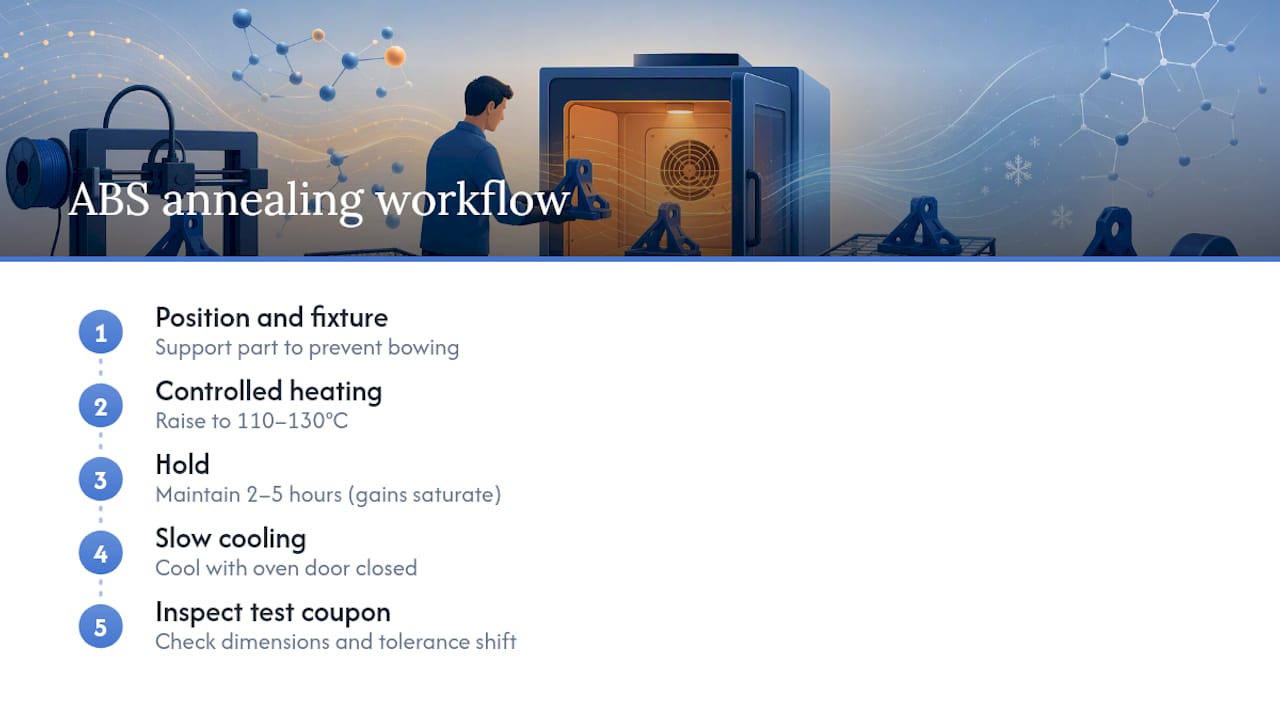
The mechanism is stress relaxation and mild densification, not a change to the polymer chemistry itself. Tg does not shift. What improves is how evenly the internal structure is packed, which relieves the residual stresses baked in during rapid FDM cooling and modestly improves both strength and effective HDT.
Pro Tip: Support the part inside the oven with a fixture that matches its shape. ABS becomes rubbery well before typical annealing temperatures, and gravity alone will bow a flat panel or ovalise a round part if it isn’t propped correctly. Cool slowly with the oven door closed rather than pulling parts straight into room temperature air.
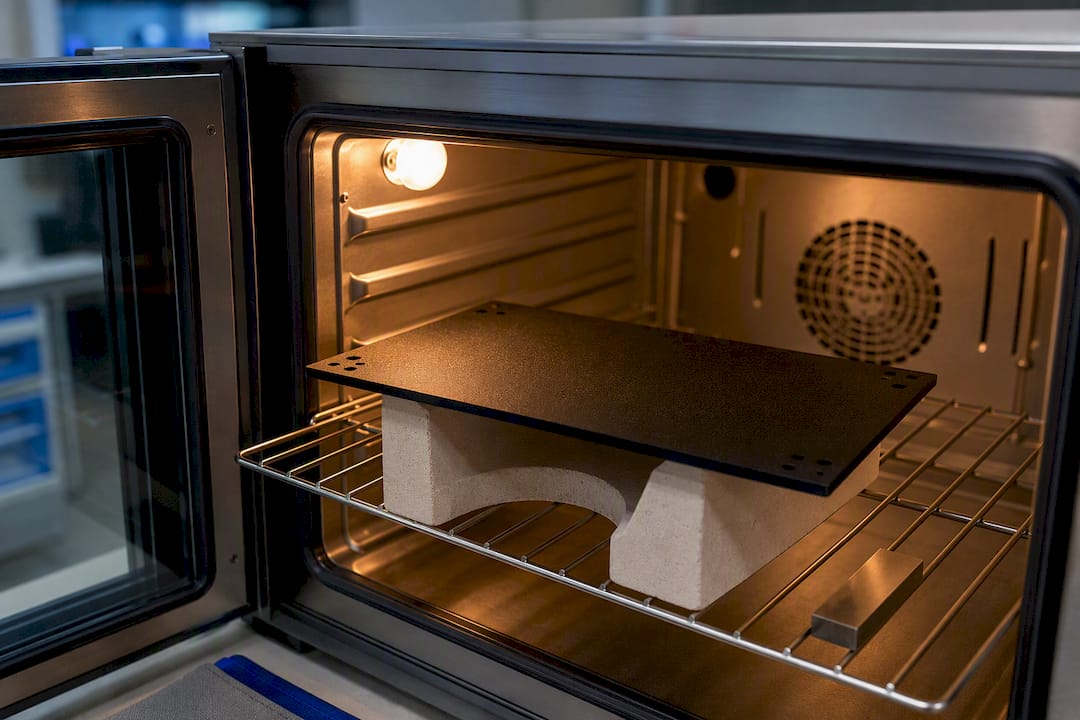
Gains saturate after a few hours, and annealing does shift dimensions slightly, so always run a test coupon before committing a production batch to the oven.
Fumes, UV ageing and flammability to keep in mind
Printing ABS at the temperatures above releases styrene and butadiene-related fumes, which is why ventilation matters as much as bed adhesion. A carbon-filtered enclosure exhaust or a vent to outside air is the practical fix; an open window in an unrelated part of the room is not enough for sustained printing sessions.
Once printed, ABS parts left outdoors or in strong sunlight degrade faster than their heat numbers alone suggest. UV exposure breaks down surface polymer chains, leaving parts yellowed, chalky, and noticeably more brittle within months, independent of temperature. And while ABS is not unusually flammable in normal service, it does burn readily once ignited and gives off dense smoke, so store spools and printed parts away from open flame or high ambient heat sources.
What I’d actually check before trusting an ABS part in the field
Pull the supplier’s datasheet and confirm HDT and Tg rather than assuming “standard ABS” numbers apply. Print with an enclosure and the correct stepped bed temperature, anneal if the part will see sustained load near its HDT, and run an in-situ thermal soak test before committing to production. ABS is fine for prototypes and moderate-heat parts; move to PC-ABS or PC once expected service temperature creeps past 70–80°C. If your supplier won’t hand over a batch datasheet, that’s worth treating as a signal.
— chris
Get batch datasheets and no minimum order on ABS filament
Some suppliers provide 3D printing filaments and equipment without minimum order quantities, which is helpful when trying to match a specific HDT figure to a real project instead of relying on generic spec sheets.

Every batch can come with technical datasheets on request, so you can check Tg, HDT and recommended printing windows before committing to a production run rather than after a part has already failed a thermal test. That’s a genuine advantage over buying filament where the only spec sheet is a marketing page: you get the actual numbers for the actual reel you’re printing with. If you’re specifying parts for anything near ABS’s practical heat ceiling, it’s worth reading Subliblanks’ notes on selecting filament for functional parts before ordering. Browse the current filament range or start an order with no minimum quantity to get datasheets sent alongside your next batch.
Sources
- PLA vs. ABS vs. PETG: Differences compared — All3DP
- ABS melting point: five temperatures that actually matter — Sigma Filament
FAQ
Is 260°C too hot for ABS?
No, 260°C sits at the top of the normal nozzle range for ABS. Problems start well above that, closer to 300–340°C, where thermal degradation and fume release become a real risk.
What are the downsides of ABS filament?
ABS warps easily without an enclosure, releases styrene fumes that need ventilation, and degrades under UV light, becoming brittle and discoloured over months of outdoor exposure.
How hot can ABS get before it melts?
ABS doesn’t have a sharp melting point since it’s amorphous, but it softens progressively from around 105°C (Tg) and starts true thermal degradation near 340–350°C.
Is ABS or PETG more heat resistant?
Standard ABS generally edges out PETG on heat deflection temperature, with PETG often sitting around 70–85°C versus ABS’s 82–100°C, though some high-temperature PETG blends narrow that gap.


