



Understanding laser engraver machines: a practical guide
TL;DR:
- A laser engraver machine uses a focused light beam to accurately cut, engrave, or mark various materials. Choosing the right laser type and mastering software settings are essential for professional results and safety. Proper focus calibration and material testing prevent common mistakes and improve engraving quality.
A laser engraver machine is a digital tool that uses a focused beam of light to precisely alter material surfaces by cutting, engraving, marking, or etching designs with exceptional accuracy and repeatability. Understanding laser engraver machines is the first step towards choosing the right equipment, producing professional results, and avoiding costly mistakes. The technology spans four main laser types: diode, CO₂, fibre, and UV, each suited to different materials and budgets. Whether you are a hobbyist personalising gifts or a small business owner producing custom products at scale, the principles covered here apply directly to your work.
What types of laser engraver machines are available?
Laser engravers fall into four main categories, and the type you choose determines which materials you can process and at what cost.
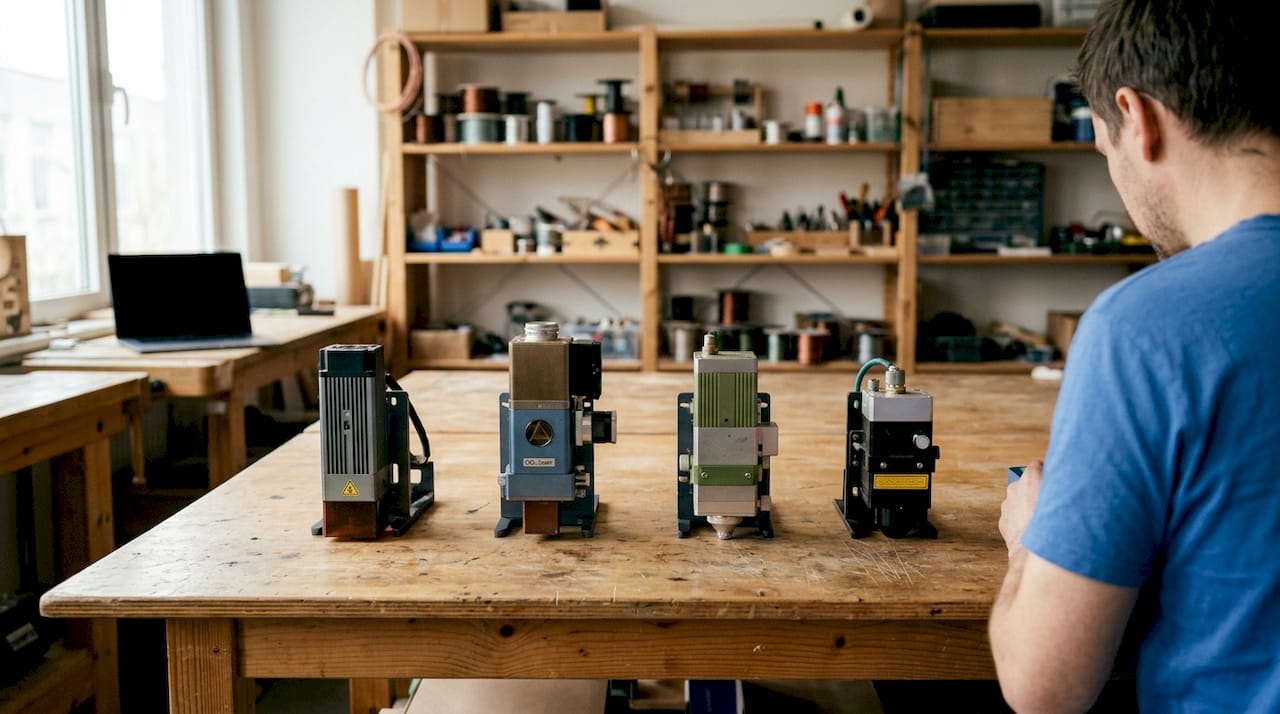
Diode lasers are the most accessible entry point. Diode lasers rated 10W–20W+ are recommended for small businesses and hobbyists due to their compact size and affordability. They work well on dark wood, leather, anodised aluminium, and coated metals, but struggle with clear or reflective materials.
CO₂ lasers use a gas-filled tube to generate a longer wavelength beam. CO₂ lasers rated 40W+ are preferred for cutting thicker organic materials like acrylics and woods. They are larger and more expensive than diode machines, but they handle a broader range of non-metal materials with ease.
Fibre lasers are the standard choice for metal marking and engraving. A single fibre laser with a MOPA source can perform marking, annealing, and engraving by adjusting software settings alone, eliminating the need for multiple machines. That flexibility makes fibre lasers particularly cost-effective for businesses working across different metal finishes.
UV lasers operate on a fundamentally different principle. UV lasers use photochemical ablation to break molecular bonds without generating heat, making them ideal for temperature-sensitive materials that would warp or discolour under a standard beam. This “cold light” approach is increasingly the preferred method for glass, medical devices, and fine plastics.
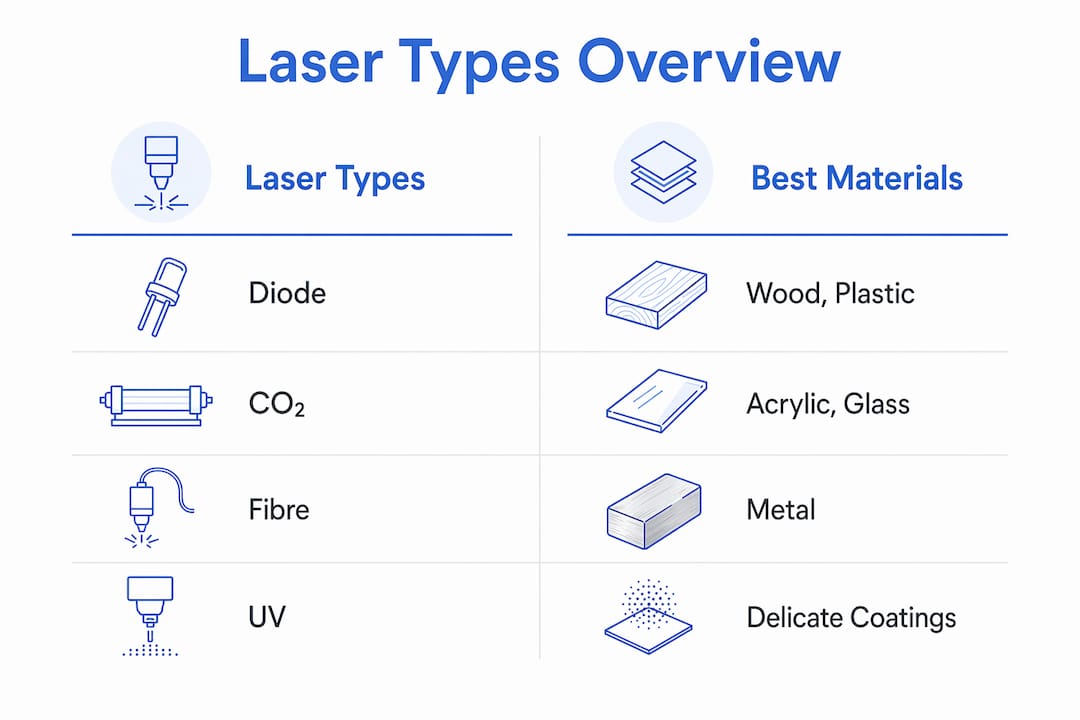
| Laser type | Typical power | Best materials | Key limitation |
|---|---|---|---|
| Diode | 10W–20W+ | Wood, leather, coated metals | Poor on clear or reflective surfaces |
| CO₂ | 40W+ | Acrylic, wood, fabric, glass | Less effective on bare metals |
| Fibre | 20W–100W | Steel, aluminium, brass | Higher upfront cost |
| UV | 3W–10W | Glass, plastics, medical materials | Slower throughput |
Pro Tip: Match your laser type to your primary material before comparing price. Buying a diode laser to engrave clear acrylic will produce poor results regardless of power, because the material does not absorb the wavelength efficiently.
How do laser engravers work, and what settings control the results?
A laser engraver works by focusing a beam of light onto a tiny spot on a material’s surface. The concentrated energy either vaporises, melts, or chemically alters the material at that point, depending on the settings and laser type used.
Four distinct material-interaction methods exist. Marking produces a colour change without removing material. Annealing forms an oxide layer on metals, creating a corrosion-resistant finish. Etching melts the surface to raise a mark. Engraving vaporises material to create a physical recess. Each method suits different applications and durability requirements.
The software layer is where these interactions are controlled. Software like LightBurn or LaserGRBL executes precise G-code instructions that dictate power, speed, and path for every engraving job. Mastering the software is as important as understanding the hardware itself.
The key settings that directly affect your output are:
- Power: Higher power removes more material but risks charring or burning through thin substrates.
- Speed: Slower passes deliver more energy per millimetre, deepening the mark. Faster passes produce lighter results.
- Number of passes: Engraving depth is best achieved with multiple lower-power passes rather than a single high-power pass. This prevents charring and enables effects like 3D relief carving.
- Focus: A 0.3 mm focus discrepancy significantly degrades edge sharpness and energy concentration. Poor focus is the most common cause of weak or smoky results, and it is often mistaken for a power problem.
- Line interval: Too-tight line interval spacing causes overheating and muddied details. Beginners should start with moderate spacing and adjust incrementally.
Pro Tip: Always run a test grid on scrap material before committing to a full job. Vary power and speed across a small matrix of squares to find the exact combination that works for your specific material and machine.
Which materials work with laser engravers, and what results can you expect?
Different materials respond to laser energy in very different ways, and knowing what to expect from each one saves time and wasted stock.
Dark wood absorbs blue diode light well, producing clean, high-contrast engravings. Light-coloured woods like maple or birch work best with a CO₂ laser. Acrylic is one of the most popular materials for laser work. Cast acrylic engraves to a frosted white finish, while clear acrylic requires a CO₂ laser because diode wavelengths pass straight through it without being absorbed.
Leather engraves cleanly with both diode and CO₂ lasers, producing a darkened, slightly raised mark. Slate and stone take a CO₂ beam well, turning white where the surface is fractured by the laser. Glass requires careful handling. A CO₂ or UV laser is needed, and the beam tends to micro-fracture the surface rather than remove material, so results depend heavily on power and speed calibration.
Metals generally require a fibre laser for direct engraving. Coated or anodised metals are the exception: a diode laser can remove the coating to reveal the base metal beneath, which is a popular technique for personalised gifts. For businesses exploring laser-engraveable blanks, pre-coated and pre-treated substrates remove much of the guesswork from material preparation.
Safety considerations vary by material. Plastics containing PVC release toxic chlorine gas when lasered and must never be used. MDF and plywood produce significant fumes due to their adhesive content. Always check the material’s composition before engraving, and run the machine with active ventilation.
Common material outcomes at a glance:
- Wood: Deep engraving with brown-to-black contrast; sanding removes residue.
- Acrylic: Frosted engraving on cast; polished cut edges on extruded.
- Leather: Darkened, tactile mark; no material removal at low power.
- Slate: White fractured surface; permanent and weather-resistant.
- Coated metals: Coating removal revealing base metal; sharp contrast.
- Glass: Frosted micro-fracture finish; requires low power and multiple passes.
Understanding why laser-engraveable blanks boost efficiency comes down to consistency. Pre-treated blanks give you a predictable starting point, which means fewer test runs and less wasted material per batch.
What are the best practices for safe and effective laser engraver operation?
Safe operation starts before you switch the machine on. Laser engravers produce intense light, fumes, and occasionally sparks. Each of these hazards requires a specific control measure.
- Wear appropriate eye protection. Standard safety glasses are not sufficient. Use optical density-rated laser safety goggles matched to your machine’s wavelength. Diode lasers typically emit in the 400–500 nm blue range; CO₂ lasers emit at 10,600 nm.
- Install active ventilation or fume extraction. A basic fan pushing air out of a window is not adequate for regular use. A dedicated fume extractor with a carbon filter removes particulates and volatile organic compounds at the source.
- Never leave the machine unattended. Laser engravers can ignite materials, particularly at high power or slow speed. Keep a fire extinguisher within reach and stay present during every job.
- Clean the lens regularly. Residue builds up on the focusing lens and reduces energy transmission. A dirty lens produces the same symptoms as a defocus error: weak, smoky results. Clean with an appropriate optical wipe after every few hours of use.
- Inspect belts and rails. Loose or worn belts cause positional errors that show up as blurred or misaligned engravings. Check tension monthly and replace belts at the first sign of wear.
- Calibrate focus before each session. Use the manufacturer’s focus tool or a known-thickness gauge. Do not rely on memory or visual estimation.
Pro Tip: Keep a job log. Record your material, power, speed, passes, and focus setting for every successful job. After a few weeks, you will have a personal settings library that eliminates repeat testing and speeds up production significantly.
For businesses integrating laser engraving into a wider manufacturing workflow, consistent maintenance schedules and documented settings are the difference between a reliable production tool and an unpredictable one.
Key takeaways
Laser engraver machines deliver consistent, professional results when you match the laser type to your material, master your software settings, and follow a disciplined maintenance routine.
| Point | Details |
|---|---|
| Match laser type to material | Diode suits coated metals and wood; CO₂ suits acrylic and organics; fibre suits bare metals. |
| Focus matters more than power | A 0.3 mm focus error degrades results more than a power reduction; calibrate before every session. |
| Use multiple low-power passes | Multiple passes prevent charring and give finer depth control than a single high-power pass. |
| Software proficiency is non-negotiable | LightBurn and LaserGRBL control every variable; learning them directly improves output quality. |
| Safety requires active ventilation | A carbon-filter fume extractor is the minimum standard for regular indoor laser engraving use. |
What I have learned from watching beginners get laser engraving wrong
Most beginners assume that poor results mean they need a more powerful machine. In my experience, that is almost never true. The real culprits are almost always focus, line interval, or software settings that have never been properly tested.
The single most common mistake I see is running a job at full power on a new material without any prior testing. The result is a charred, overcooked mess that puts people off the technology entirely. A simple 5x5 test grid on a scrap piece of the same material, varying power across the columns and speed across the rows, solves this problem in under ten minutes.
The second thing I would tell any beginner is to invest time in LightBurn before investing money in a more expensive machine. The software gives you control over every parameter that matters, and most people use perhaps 20% of its capability. Unlocking the rest is free and transforms what your existing machine can do.
Choosing the right laser type for your primary use case is genuinely important, but it is a one-time decision. Once you have the right machine, the returns come from skill, not from hardware upgrades. The essential guide to laser-engraveable blanks for UK makers is a good starting point for understanding which substrates will give you the most consistent results while you are still building that skill.
— chris
Subliblanks: supplies and equipment for your laser engraving projects
Subliblanks supplies xTool laser engraving machines alongside a full range of laser-engraveable blanks, with no minimum order quantities. That means you can order a small batch to test a new material or product line without committing to bulk stock upfront.
The Subliblanks product range covers everything from pre-coated wooden blanks and slate coasters to acrylic sheets and metal substrates, all selected for consistent laser compatibility. Whether you are setting up your first machine or expanding an existing product catalogue, Subliblanks stocks the materials and equipment to support your work at every stage.
FAQ
What is a laser engraver machine?
A laser engraver machine is a device that uses a focused beam of light to cut, engrave, mark, or etch designs onto material surfaces with high accuracy. The laser type and settings determine the depth, contrast, and finish of the result.
What is the difference between laser engraving and laser etching?
Laser engraving vaporises material to create a recessed mark, while laser etching melts the surface to produce a raised mark without removing material. Engraving is more durable; etching is faster.
Which laser type is best for beginners?
A diode laser in the 10W–20W range is the best starting point for most beginners. It is affordable, compact, and effective on wood, leather, and coated metals, which are the most common beginner materials.
Can laser engravers work on metal?
Bare metals require a fibre laser for direct engraving. Coated or anodised metals can be processed with a diode laser, which removes the coating to reveal the base metal beneath.
How do I get sharper engraving results?
Calibrate your focus before every session and run a test grid on scrap material to find the correct power and speed combination. Focus discrepancies as small as 0.3 mm are enough to cause blurred, weak results.


