



Stock 8 Print Shop Consumables: Reorder Math and No Minimum Sourcing
Keep eight categories stocked and most print shop downtime disappears: ink or toner, drum and imaging units, fuser and maintenance kits, paper and speciality media, cleaning supplies, waste containers, and spare rollers or belts. Get these on a device-mapped reorder schedule, and you cut emergency orders and keep output consistent. The breakdowns below cover exact stocking numbers, process-specific lists, and how to store everything without wasting money.
TL;DR:
- Most shops should keep at least one spare drum and fuser kit for each high-volume device to prevent unexpected downtime.
- Storing consumables in original packaging, keeping stock off the floor, and rotating stock reduces waste and maintains quality.
- Reorder points should be based on average weekly usage multiplied by supplier lead time, with safety buffers for critical items like toner.
- Generic cartridges cost less but can compromise color accuracy and warranty, so buy quality for items touching the final product.
- Use trade wholesalers with no minimum order quantity to consolidate supplies and simplify stock management for multiple printing processes.
Table of Contents
- The complete print shop consumables checklist
- Building your list by printing process
- Storage, shelf life and handling that protect quality
- Working out your reorder points without overstocking
- Disposing of used consumables the right way
- Sourcing consumables through a trade wholesaler
- Handling hazardous consumables safely
- Weighing cost against quality on consumable choices
- What experience actually teaches about print shop stock
- Where to actually buy your checklist items
- Sources
- FAQ
The complete print shop consumables checklist
A consumable is anything a printer or finishing device uses up during normal operation, as opposed to the machine itself or a one-off capital purchase. That distinction matters when you’re budgeting, because consumables need a recurring line in your spending, not a one-time entry.
Here’s the master list, grouped the way most maintenance schedules already think about them.
Ink and toner (including high-yield variants). Standard cartridges cover typical office or short-run jobs; high-yield versions cost more upfront but print more pages per unit, which usually works out cheaper per page on high-volume devices. Stock a small number of spare cartridges per active colour per device, and check the fill level before starting a large job rather than mid-run.
Drum units and imaging units. These transfer toner to paper and wear out on a page-count cycle, typically lasting three to four toner cartridge cycles depending on the model. Keep at least one spare drum unit per device once usage reaches a significant part of the drum’s rated life, to prevent downtime from unexpected failures.
Fuser assemblies and maintenance kits. The fuser bonds toner to paper using heat and pressure, and a full maintenance kit usually bundles the fuser with rollers and a transfer belt. One kit per high-volume device per 100,000 to 200,000 pages is a sound baseline, though manufacturer specs vary and you should check the device’s own service manual.
Paper and speciality media. Beyond standard stock, this covers card stock, adhesive labels, and heat-transfer paper. Buy in cartons rather than reams for busy shops, and always keep a small reserve of the exact weight and finish your regular clients expect, since a substitution mid-order is the fastest way to lose repeat business.
Cleaning consumables. Lint-free cloths, isopropyl alcohol, and compressed air dusters belong in every shop’s supply cupboard, not just the service technician’s toolbox. A quick wipe of rollers and glass elements weekly prevents the streaking and banding that otherwise gets blamed on the ink.
Waste containers and ink waste tanks. Inkjet and some laser systems collect overspray or excess toner in a removable tank. These fill faster than most new shop owners expect, and running one past capacity can cause a mess that reaches internal components. Keep at least one spare per device that produces meaningful waste volume.
Spare rollers, belts, and transfer assemblies. Pickup rollers, feed rollers, and transfer belts are technically parts, but shops that run high volumes treat them as consumables because they wear out on a predictable schedule. A worn pickup roller shows up as misfeeds and skewed pages long before it fails outright.
A printer consumables checklist organised by device type, with a recommended buffer and a monthly review date, is the difference between reactive ordering and a calm supply chain.
A few things to watch across the whole list:
- Match part numbers exactly. Chip-locked cartridges and firmware-gated consumables will reject a mismatched part outright, so note the device’s exact model and revision, not just the family name.
- Be cautious with generic or remanufactured consumables on newer devices; some manufacturers void warranty cover if a non-approved part causes damage.
- Label every box with the date received and the device it’s assigned to. It sounds basic, but mislabelled stock is the single biggest cause of using an expired or wrong-spec item under deadline pressure.
- Inspect cartridges and drums for damage or leaking before loading them, especially after shipping in cold weather, when seals can shrink slightly.
Building your list by printing process
A general checklist gets you started, but a printing supplies checklist built around your actual workflow saves more time. Different processes consume wildly different things, and grouping by process stops you over-ordering for a machine you barely run.
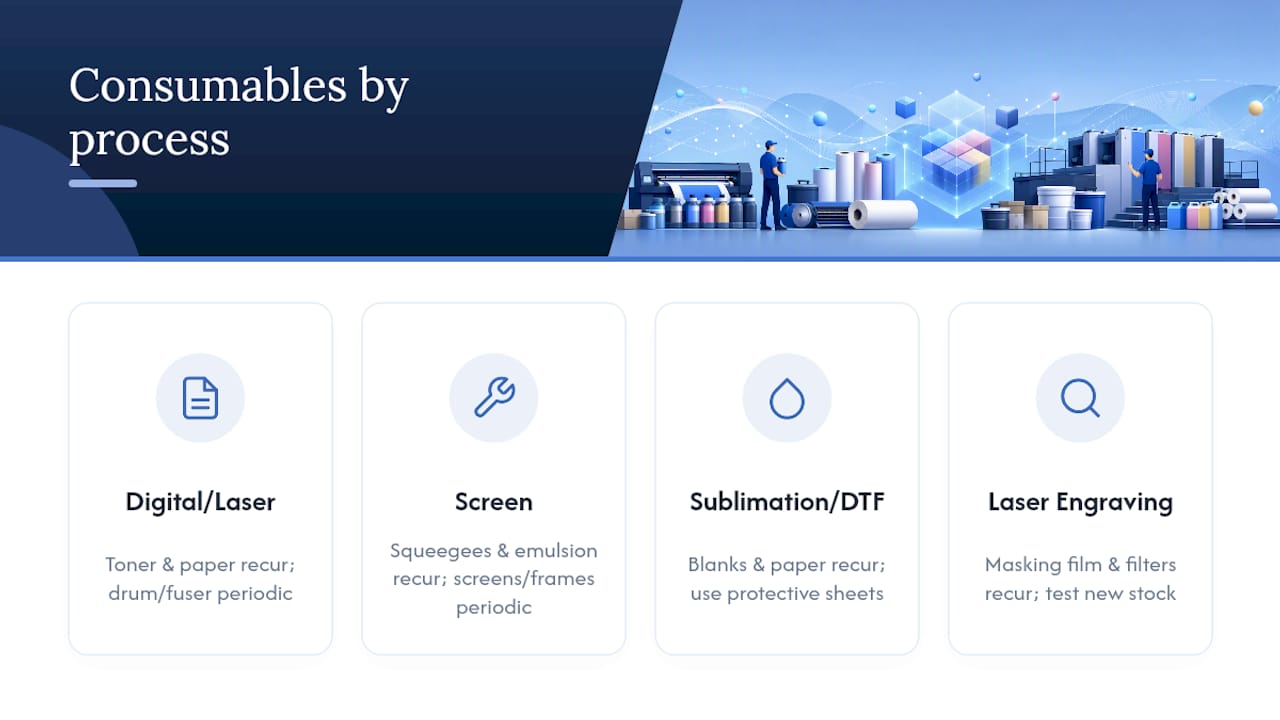
Digital and laser printing. This is the list above in miniature: toner, drums, fusers, and paper. What’s used up every job is toner and paper; what gets replaced periodically is the drum, fuser, and transfer belt.
Screen printing. Screens, frames, mesh, squeegees, emulsion, and exposure supplies form the backbone here, and industry guidance consistently recommends buying quality emulsion and exposure equipment before investing in advanced ink-mixing systems. New shops overspend on colour variety before they’ve mastered the basics of a clean screen and consistent exposure. Squeegee blades wear on a job-count basis and should be checked for nicks weekly if you’re running daily jobs.
Sublimation and DTF. Sublimation blanks, transfer paper, and heat tape are used up every job; heat presses and platens are periodic replacements. DTF adds film, powder, and a curing step, and both processes need protective sheets between the heat platen and the substrate to stop scorching or ghosting. Our guide to DTF supplies for print businesses breaks these down by starter kit versus ongoing consumable, and the sublimation equipment list covers inks and press accessories specifically.
Laser engraving. Masking film, exhaust filters, and material-specific stock (acrylic, plywood, coated metals) are the recurring spend. Laser material suppliers recommend testing any new stock on a single device before committing to a bulk run, since fusing behaviour varies between batches of the same material type.
Storage, shelf life and handling that protect quality
Ink and toner degrade with age even unopened. Most manufacturers rate sealed toner cartridges for around two years and inkjet cartridges for closer to one, though heat and humidity shorten both. Coated media absorbs moisture from the air and can jam or print unevenly if it’s been stored somewhere damp for weeks.
Storage rules worth following without exception:
- Keep cartridges and toner in original sealed packaging until use, stored upright, not on their side.
- Store media flat, wrapped, and off the floor, away from direct sunlight and heating vents.
- Maintain a stable room temperature and moderate humidity; avoid storerooms that swing between hot and cold.
- Keep Safety Data Sheets (SDS) accessible for every hazardous consumable, ideally in a binder near the storage area, not buried in an email inbox.
- Rotate stock on a first in, first out basis so older batches get used before newer ones.
Pro Tip: Write a “last verified” date on every box when you check stock levels each month. It takes ten seconds per item and turns a guessing exercise into a two-minute audit next time.
Working out your reorder points without overstocking
A simple formula avoids both extremes, running out mid-job and tying up cash in stock you won’t touch for months:
- Calculate average weekly usage for the item (e.g. 3 toner cartridges per week for your main laser printer).
- Multiply by supplier lead time in weeks (say, 2 weeks) to get 6 cartridges as your baseline need.
- Add a safety buffer, typically 1 to 2 units for critical items, giving a reorder point of 7 to 8 cartridges.
- Trigger the order the moment stock drops to that number, not when it hits zero.
Not every SKU deserves the same treatment. Split your list into critical (the device stops without it, like toner for your main press), important (quality drops but the job can still ship, like a worn roller), and optional (nice to have on hand, like an extra speciality media weight). Critical items get the tightest reorder point and the biggest buffer; optional items can wait for a routine monthly order. Consolidating SKUs across similar devices, and keeping one master sheet mapping each consumable to the device it fits, makes the monthly check something you can do in fifteen minutes rather than an afternoon.
Disposing of used consumables the right way
Most cartridge and toner manufacturers run take-back schemes, and many trade wholesalers offer a return path for empties as part of a standing order relationship. Authorised recycling centres handle the rest, particularly for bulk waste like spent developer or solvent-based cleaning fluids.
For anything hazardous, act before it becomes a storage problem:
- Label containers clearly with contents and date, and keep the relevant SDS on hand.
- Never mix chemical waste types in one container.
- Use an authorised waste carrier for large volumes rather than standard refuse collection.
- Consolidate returns into single shipments where your supplier allows it, since this usually reduces per-unit collection costs.
- Where two consumable options perform similarly, favour the one with an established recycling or take-back route.
Sourcing consumables through a trade wholesaler
A trade wholesaler earns its place in your supply chain by carrying breadth most single-brand suppliers can’t match, sublimation blanks, printers and heat presses, DTF consumables, laser machines, badge-making supplies, and general packaging, all under one account. That consolidation means fewer supplier relationships to manage and fewer separate deliveries to track against your reorder sheet.
Subliblanks operates with no minimum order quantity, which matters most to smaller shops that can’t commit to a pallet of one item just to unlock trade pricing. If you’re building out a device-mapped checklist, the practical move is to check which collections cover your active machines, sublimation blanks, printers and heat presses, DTF supplies, laser blanks, and consumables generally, before you place a routine order.
Handling hazardous consumables safely
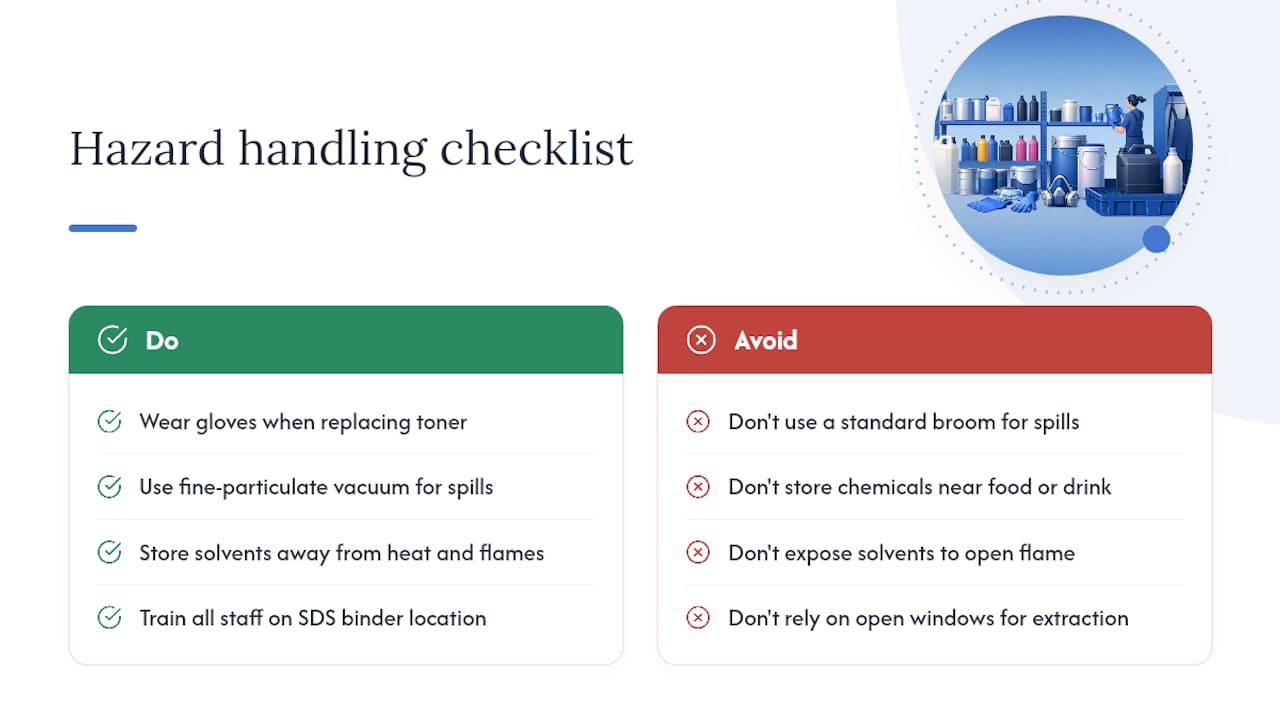
Toner dust, cleaning solvents, and some inks carry genuine handling risks, and treating them casually is how minor spills become bigger problems. Toner particles are fine enough to become an inhalation hazard in enclosed spaces, so a vacuum cleaner rated for fine particulate, never a standard broom, is the correct clean-up tool for a spill.
Isopropyl alcohol and other solvent-based cleaners are flammable and should be stored away from heat sources and any open flame, including soldering stations if your shop also does badge-making or engraving finishing work. Always check the SDS for a new cleaning product before your first use, not after something goes wrong.
Basic handling rules that apply across nearly every consumable type: wear gloves when replacing toner or handling used cartridges, keep hazardous liquids in their original containers with intact labels, and never store chemical consumables near food or drink areas. If your shop runs laser engraving alongside other processes, exhaust ventilation isn’t optional. Off-gassing from certain plastics and coated materials during cutting needs proper extraction, not just an open window.
Train every team member who handles consumables, not just the person who orders them. A part-timer covering a shift who doesn’t know isopropyl alcohol is flammable is a genuine liability, and a five-minute induction covering the SDS binder location solves that cheaply.
Weighing cost against quality on consumable choices
Generic and remanufactured cartridges typically cost 30 to 50% less than original manufacturer parts, and for low-stakes internal printing that gap is hard to ignore. The trade-off shows up in consistency: colour accuracy can drift between batches, and some generics print noticeably lighter or heavier than the manufacturer spec, which matters enormously on client-facing proofs.
High-yield cartridges cost more per unit but usually work out cheaper per page, so the right call depends entirely on volume. A shop running a few hundred pages a week rarely recoups the premium; a shop running several thousand almost always does.
Speciality media follows a similar logic. A budget heat-transfer paper might handle simple single-colour jobs fine but struggle with fine detail or multi-layer designs, so testing new stock against your actual job mix before switching suppliers wholesale, rather than after committing to a bulk order, avoids an expensive lesson.
The honest rule of thumb: buy quality on anything that touches the final product a client will see or handle, and save on anything purely internal. Cutting corners on drum units or fuser kits to save a small amount upfront tends to cost more in downtime than it saves in cash.
What experience actually teaches about print shop stock
The consumables shops run out of most are the boring ones: waste bottles, spare rollers, protective sheets for heat transfers. A monthly “last verified” review, paired with one central device-to-consumable map, fixes that faster than any amount of extra ordering.
— chris
Where to actually buy your checklist items
A wholesaler with no minimum order quantity lets you order exactly what your reorder sheet calls for, whether that’s one drum unit or a full carton of transfer paper, without padding an order to hit a supplier’s threshold.

The category range maps cleanly onto the checklist covered here. Start with sublimation blanks if that’s your core process, browse printers and heat presses for the equipment and consumable kits that keep those devices running, or check DTF consumables for film, powder, and transfer accessories. Building a device-mapped reorder list gets considerably easier once one supplier can fulfil most of it in a single order.
Sources
- The complete printer consumables supply checklist – Printcom
- Essential screen printing supplies: complete checklist
- Materials for laser engraving, laser cutting & DIY | xTool Materials
FAQ
What are consumables in printing?
Consumables are the items a printer or finishing device uses up during normal operation, ink, toner, paper, cleaning supplies, and waste containers, as opposed to the machine itself. Parts that wear out on a predictable schedule, like drums and rollers, are also usually classed as consumables because shops replace them on a routine basis rather than repairing them.
What sells best on print on demand?
Custom apparel, drinkware, and personalised gifts using sublimation or DTF tend to dominate print-on-demand sales because they combine low per-unit cost with high perceived value. Shops running these lines typically stock sublimation blanks or DTF film and powder as their core recurring consumable spend.
Can you give 10 examples of print materials?
Ink cartridges, toner, drum units, fuser kits, transfer belts, card stock, adhesive labels, heat-transfer paper, waste toner containers, and cleaning cloths cover the ten most commonly stocked items across digital and screen-printing shops. Process-specific shops add screens and emulsion for screen printing, or transfer film and heat tape for sublimation and DTF.
What are the three main consumables for printers?
Ink or toner, paper, and the imaging drum are generally treated as the three core printer consumables, since a printer cannot function without any of the three. Fuser units and waste containers follow close behind on most maintenance schedules, particularly for high-volume laser devices.
How much buffer stock should a small print shop keep?
A common baseline is 1 to 2 spare cartridges per device and one maintenance kit per high-volume device every 100,000 to 200,000 pages, adjusted for your actual lead times. Critical items that would halt production need a tighter reorder point than optional stock you can order on a routine monthly cycle.


